


New

-
 Buy now, pay later with Klarna
-
 Pay in 3 interest-free payments with PayPal



£16.53 inc VAT
45 in stock
Buy now, pay later with Klarna
Pay in 3 interest-free payments with PayPal
1-3 Days
Delivery on orders over £100
£5.80
Free
Payment Methods:
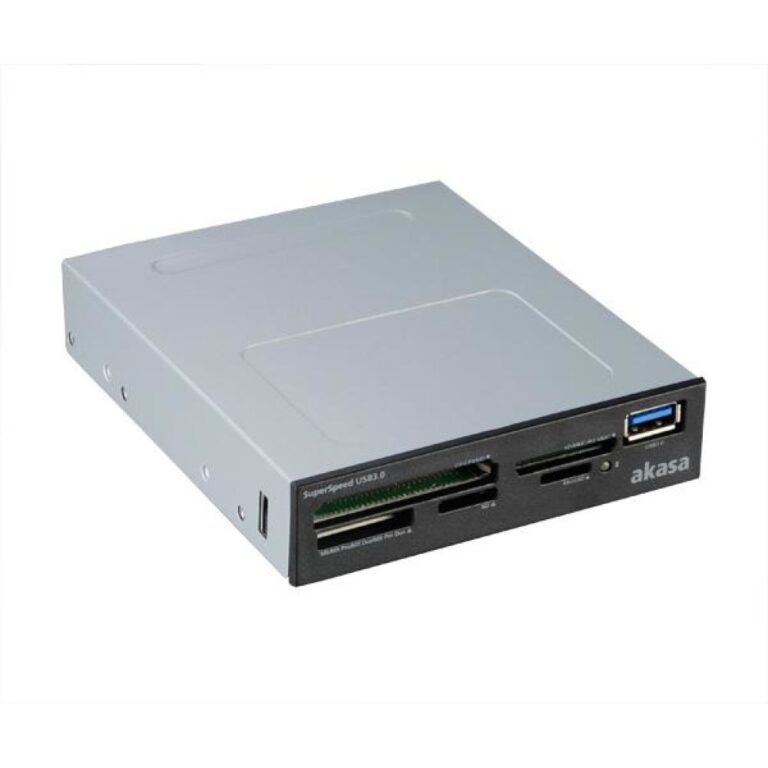
The Akasa AK-ICR-07 card reader USB 2.0 Internal brings six memory card slots to your desktop in a single 3.5″ bay. It supports SDHC, microSD, and M2 cards without adapters, plus an extra USB 2.0 port for quick data transfers from memory sticks or phones.
| Metric | Spec |
|---|---|
| Interface | USB 2.0 |
| Data transfer rate | 480 Mbit/s |
| Supported drive bays | 3.5″ |
| Compatible OS | Windows XP / Vista / 7 |
| SIM card support | No |
With six dedicated slots, this reader handles the most common memory card formats in one place. SDHC compatibility means you can use high-capacity cards directly, while microSD and M2 ports remove the need for fiddly adapters. Two fascia panels—mat black or classic white—let you match your PC’s style.
Mounting in a 3.5″ bay puts card access right at your fingertips, saving you from reaching around the back of your PC. The extra USB 2.0 port is ideal for quick plug-and-play transfers from USB sticks or mobile devices, making this a practical front-panel hub.
Two LED indicators keep you informed: one shows power-on status, another signals when a card is inserted or data is transferring. This visual feedback helps prevent accidental removal mid-transfer and confirms the reader is active.
A: No, it only supports SDHC cards, not SDXC.
A: The manufacturer lists support only for Windows XP, Vista, and 7; compatibility with newer versions is not guaranteed.
A: No, it connects via an internal USB 2.0 header, so no external cable is needed.
A: No, the unit has dedicated ports for both microSD and M2 cards.
The Akasa AK-ICR-07 card reader USB 2.0 Internal is a straightforward upgrade for anyone needing quick, front-panel access to multiple memory card formats. Its clean design, dual fascia options, and status LEDs make it a practical fit for home or office PCs running supported Windows versions. Covered by the standard Manufacturer Warranty.
| Storage | |
|---|---|
| Internal | Yes |
| SIM card support | No |
| Supported drive bays | 3.5" |
| Performance | |
| Internal | Yes |
| Supported drive bays | 3.5" |
| Data transfer rate | 480 Mbit/s |
| Compatible operating systems | Windows XP / Visa / 7 |
| Ports & interfaces | |
| SIM card support | No |
| Interface | USB 2.0 |
| Data transmission | |
| Data transfer rate | 480 Mbit/s |
| System requirements | |
| Compatible operating systems | Windows XP / Visa / 7 |
| Other features | |
| Compatible operating systems | Windows XP / Visa / 7 |
| Technical details | |
| Interface | USB 2.0 |
| Harmonized System (HS) code | 84719000 |
| Logistics data | |
| Harmonized System (HS) code | 84719000 |
| Identifiers | |
| Additional EANs | 9865745910677 |
No account yet?
Create an Account
Contact us
Reviews
Clear filtersThere are no reviews yet.