MA310E – Add 2.5 Gbps Ethernet to your PC
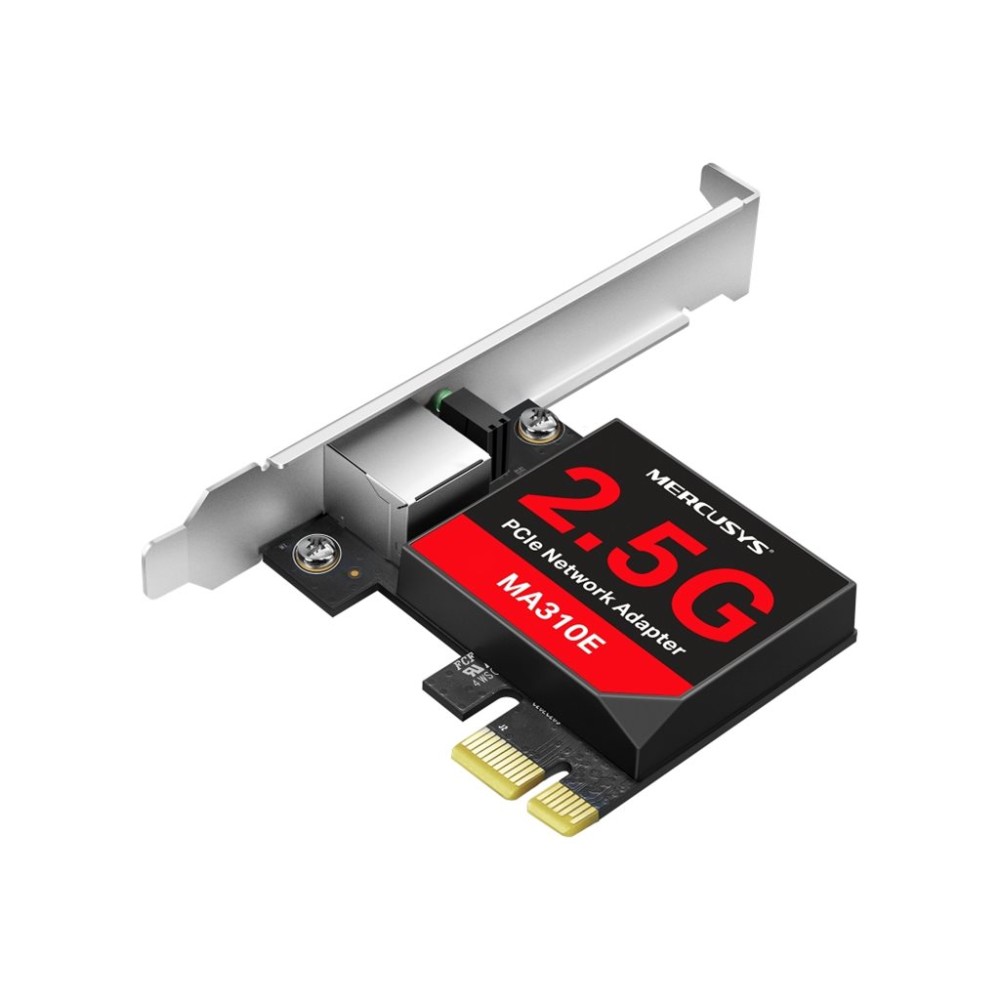
For users who want faster wired networking, the MA310E adds 2.5 Gbps Ethernet to a PC with a PCIe slot. Its 2.5G Base-T technology supports a high-speed wired connection.
MA310E network adapter: key details
| Metric |
Specification |
| Adapter type |
PCIe Ethernet network adapter |
| Ethernet technology |
2.5G Base-T |
| Network speed |
2.5 Gbps |
| Bracket |
Low-profile bracket included |
Get 2.5 Gbps wired networking
The MA310E provides 2.5 Gbps networking over a wired Ethernet connection. This can suit a PC setup where you want a faster network link. To make use of that speed, your connected network equipment must also support it.
Choose a bracket to suit your case
A low-profile bracket is included, giving you an option for a case designed around a low-profile card. Check the case and available PCIe slot before ordering, so the adapter suits your PC’s internal layout.
Check your PC and network setup
- Confirm your PC has a free PCIe slot.
- Check that your case accepts a low-profile bracket.
- Confirm your network equipment supports 2.5G Base-T for 2.5 Gbps networking.
Frequently Asked Questions
Q: What type of adapter is the MA310E?
A: It is a PCIe Ethernet network adapter.
Q: What network speed does it support?
A: It supports 2.5 Gbps networking through 2.5G Base-T technology.
Q: Is a low-profile bracket included?
A: Yes, a low-profile bracket is included.
A practical choice for faster wired networking
We recommend the MA310E for buyers who want 2.5 Gbps Ethernet in a PCIe network adapter. Check your slot, case bracket fit and network equipment before choosing it.


 DPD tracked delivery
 Buy now, pay later with Klarna at checkout
 Pay in 3 instalments with PayPal at checkout


Reviews
Clear filtersThere are no reviews yet.