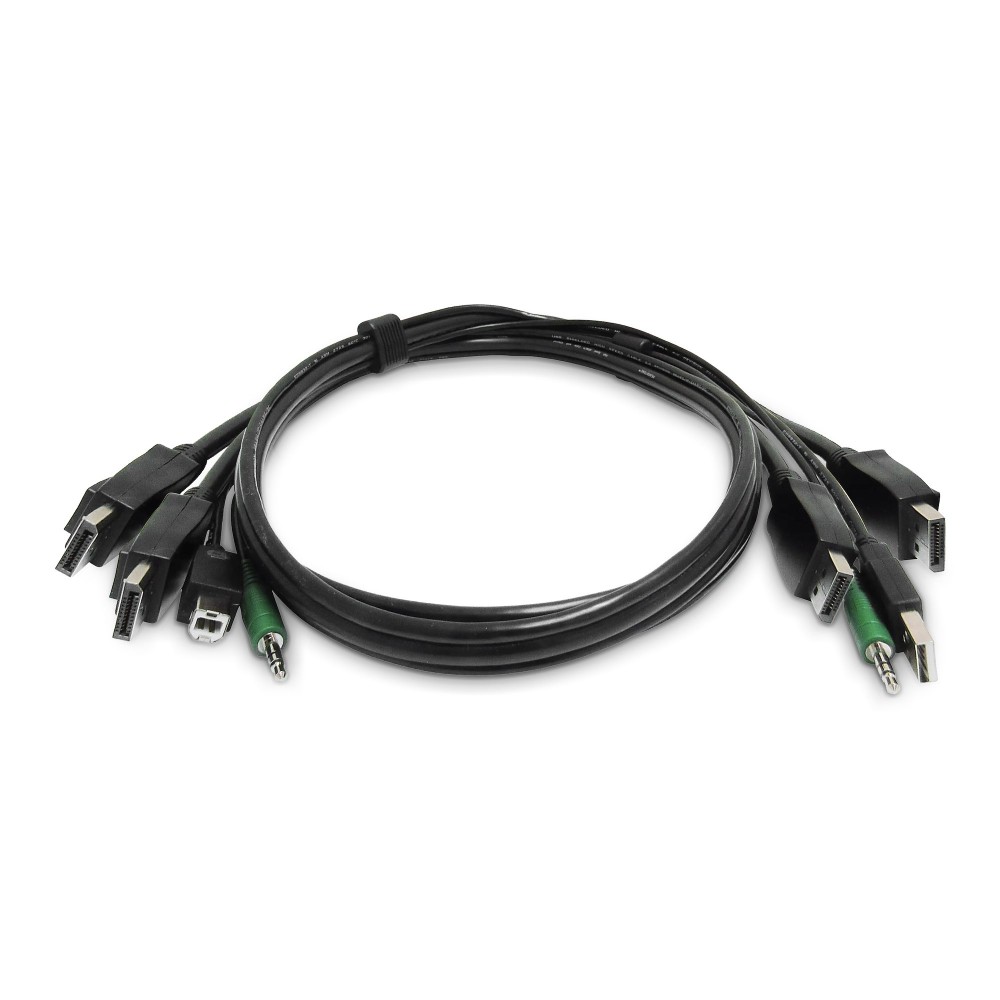
StarTech.com Dual DisplayPort KVM Cable – combine connections in one cable
We recommend the StarTech.com Dual DisplayPort KVM Cable for anyone connecting a computer to a dual-DisplayPort KVM switch. It combines two DisplayPort connections, two USB connections and 3.5mm audio in one 1.8m cable, helping keep your setup tidy.
Essential cable specifications
| Metric |
Specification |
| Cable length |
1.8m |
| Video connections |
2 x DisplayPort at each end |
| USB connections |
2 x USB-A and 2 x USB-B |
| Audio connection |
3.5mm at each end |
| Colour |
Black |
| Cable weight |
100g |
Streamline a dual-display KVM setup
The cable carries two DisplayPort connections, so you can connect both displays through a compatible dual-DisplayPort KVM switch. It also combines USB and 3.5mm audio connections, reducing the number of separate cables to manage.
One end has two DisplayPort, two USB-A and a 3.5mm connector. The other has two DisplayPort, two USB-B and a 3.5mm connector. Check that these match the connections on your computer and KVM switch.
Ready for common operating systems
This cable supports Windows, macOS, ChromeOS and Linux. It is also TAA-compliant, making it suitable for purchasing requirements that call for that compliance.
Check your connections before ordering
- Confirm your computer and KVM switch have matching dual-DisplayPort connections.
- Check that the USB-A and USB-B connectors suit your equipment.
- Confirm both devices support the 3.5mm audio connection.
- Check that 1.8m provides enough reach for your setup.
Frequently Asked Questions
Q: How long is the cable?
A: It is 1.8m long.
Q: Which video connections does it use?
A: It has two DisplayPort connectors at each end.
Q: Which operating systems does it support?
A: It supports Windows, macOS, ChromeOS and Linux.
A practical choice for dual-display KVM connections
Choose the StarTech.com Dual DisplayPort KVM Cable when you need to combine dual DisplayPort, USB and 3.5mm audio connections in one cable. Its 1.8m length suits setups where those connections need to run between a computer and a KVM switch.


 DPD tracked delivery
 Buy now, pay later with Klarna at checkout
 Pay in 3 instalments with PayPal at checkout

Reviews
Clear filtersThere are no reviews yet.