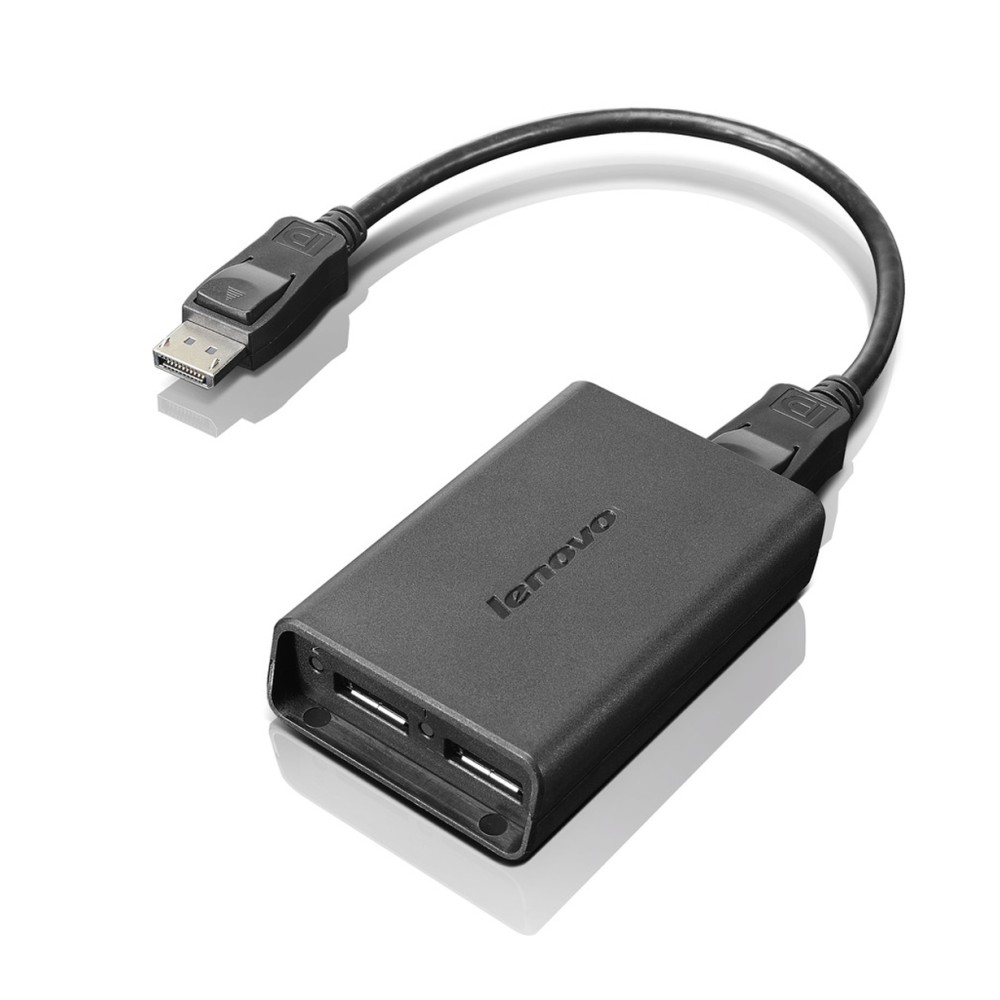
Lenovo DisplayPort to Dual DisplayPort Adapter – extend one output to two monitors
The Lenovo DisplayPort to Dual DisplayPort Adapter suits ThinkCentre users who want to run two monitors from one DisplayPort output. Its Expanded mode supports two identical monitors, helping you extend your desktop without an expensive graphics card.
Key details at a glance
| Metric |
Specification |
| Colour |
Black |
| Connector 1 |
USB-A male |
| Connector 2 |
USB-A female |
| Display modes |
Expanded and Mosaic |
| Expanded mode |
One ThinkCentre DisplayPort to two identical monitors |
| Quad Mosaic mode |
Two ThinkCentre DisplayPorts to four identical monitors |
Set up an expanded desktop
In Expanded mode, connect one ThinkCentre DisplayPort to two identical monitors. You will also need two DisplayPort cables. This arrangement is useful when you want more screen space for work across two displays.
Build a four-monitor mosaic
For Quad Mosaic mode, use two of these adapters with two ThinkCentre DisplayPorts. Connect four identical monitors using four DisplayPort cables. This gives you a four-screen setup without adding an expensive graphics card.
Check your setup before ordering
- Confirm your ThinkCentre has a DisplayPort output for the mode you plan to use.
- Check that your monitors are identical.
- Confirm you have two DisplayPort cables for Expanded mode.
- Check that you have four DisplayPort cables and two adapters for Quad Mosaic mode.
Frequently Asked Questions
Q: How many monitors does Expanded mode support?
A: Expanded mode connects one ThinkCentre DisplayPort to two identical monitors.
Q: What is needed for Quad Mosaic mode?
A: Use two adapters, two ThinkCentre DisplayPorts, four identical monitors and four DisplayPort cables.
Q: Does the adapter require an expensive graphics card?
A: The described multi-monitor setups work without an expensive graphics card.
A practical choice for multi-screen ThinkCentre setups
Choose the Lenovo DisplayPort to Dual DisplayPort Adapter if you want to connect two monitors in Expanded mode or create a four-monitor Quad Mosaic setup. Check your display outputs, monitors and cables before ordering.


 DPD tracked delivery
 Buy now, pay later with Klarna at checkout
 Pay in 3 instalments with PayPal at checkout

Reviews
Clear filtersThere are no reviews yet.