ATEN KA7169 – DisplayPort KVM connectivity
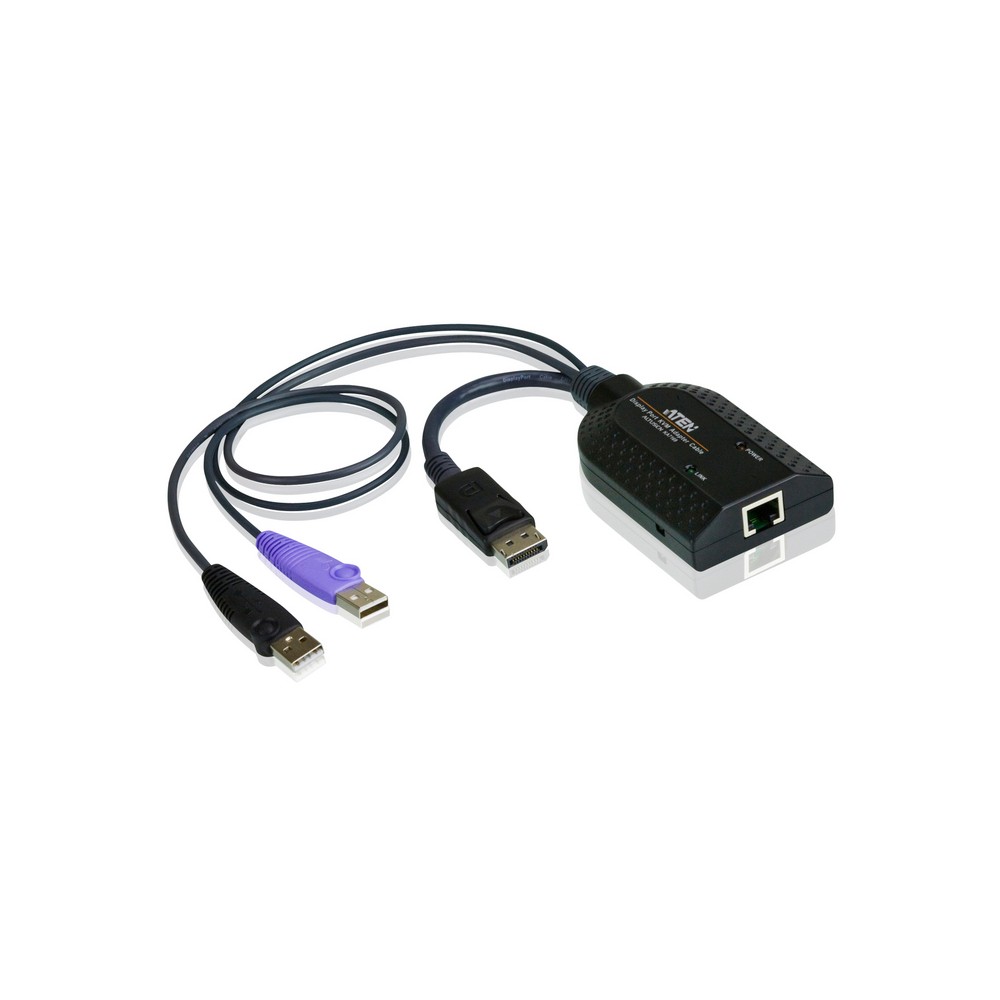
The ATEN KA7169 suits buyers connecting a DisplayPort computer to a KVM switch over Cat5e/6 cabling. Its automatic signal compensation adjusts for different cable distances without manual DIP switch settings.
Key details at a glance
| Metric |
Specification |
| Video connection |
DisplayPort |
| KVM connection |
Cat5e/6 |
| USB interface |
USB 2.0 |
| USB ports |
2 |
| Dimensions (W × D × H) |
56 × 91 × 21 mm |
| Weight |
104 g |
Simplify KVM installation
Connect the adapter to a target computer’s DisplayPort video and USB ports, then link it to the KVM switch using Cat5e/6 cabling. Because signal compensation works without DIP switch adjustments, setup can accommodate different cable distances more easily.
The compact 104 g design is easy to position alongside connected equipment. Also, built-in keyboard and mouse emulation helps keep a server functioning if it is disconnected from the KVM switch or moved to another KVM port.
Support for specialist workflows
The KA7169 supports virtual media and Smart Card/CAC readers. This makes it suitable for KVM setups that need those functions alongside DisplayPort video and USB connectivity.
Check your setup before ordering
- Confirm the target computer has DisplayPort video and a USB connection.
- Check that your KVM setup accepts this adapter and uses Cat5e/6 cabling.
- Confirm Smart Card/CAC or virtual media support fits your intended workflow.
- Check that the adapter’s 56 × 91 × 21 mm dimensions suit your installation space.
Frequently Asked Questions
Q: What video connection does the KA7169 use?
A: It connects to a target computer’s DisplayPort video output.
Q: What cabling links it to a KVM switch?
A: It uses Cat5e/6 cabling for the KVM connection.
Q: Does it support Smart Card/CAC readers?
A: Yes. It supports Smart Card/CAC readers, as well as virtual media.
Q: Does it need manual signal settings for different distances?
A: No. Automatic signal compensation works without DIP switch settings for different distances.
A practical choice for KVM users
Choose the ATEN KA7169 when you need to connect a DisplayPort and USB computer to a Cat5e/6 KVM setup. Its automatic signal compensation and keyboard and mouse emulation help simplify day-to-day operation.

 DPD tracked delivery
 Buy now, pay later with Klarna at checkout
 Pay in 3 instalments with PayPal at checkout

Reviews
Clear filtersThere are no reviews yet.