The Dial Codes Can’t Tell You: How to Know if Your Phone Is Hacked, and What Does
Almost certainly not, and the codes people tell you to dial cannot answer the question anyway. *#21# is a call forwarding status check. It is defined that way in 3GPP TS 22.030, the specification every mobile phone on earth follows, and it says nothing at all about malware. The genuine warning signs are account sign-in alerts you did not ask for, apps you did not install, and a management profile you did not add. Apple and Google both build a proper check into the phone, and both take under a minute.
What made you worry?
- My battery drains and the phone runs hotThe weakest signal on the list. Which signs actually mean something
- Someone told me to dial a codeThey control call forwarding. What those codes really do
- I want to know what *#21# doesInterrogate call forwarding. Nothing else. The codes, decoded
- I have an iPhoneTwo screens, one minute. The iPhone checks
- I have an Android phonePlay Protect and app permissions. The Android checks
- I think someone I know installed somethingThis is the common case. Stalkerware
- I need to act right nowIn this order. The next ten minutes
- I want to report itFree, and it takes a text. Reporting it in the UK
- How to know if your phone is hacked: the signs that actually mean something
- What to dial to see if your phone is hacked, and what those codes really do
- *#21# and ##002#: what the spec actually says
- How to tell if your phone has been hacked: the iPhone checks
- Has my phone been hacked? The Android checks
- Spyware on phone: what stalkerware actually looks like
- Is my phone hacked? What to do in the next ten minutes
- Reporting it in the UK, and who to call
- How to know if my phone is hacked next time, and how to stop it
- Quick answers
If you are here because something felt wrong, start with the reassuring part. Phones are hard to compromise remotely, and the odds are strongly against you having been targeted by anything sophisticated. Apple says as much in its own documentation: the extreme protection it built for people who really are targeted is described as being for “the very few individuals”, and it adds that “most people will never be targeted by attacks of this nature”.
The problem is that the advice you find is mostly wrong in a specific way. It tells you to dial a short code and read the result as a verdict on whether you have been hacked. So we went and read the specification that defines those codes. It is a public telecoms document, and it settles the question in a single table.
How to know if your phone is hacked: the signs that actually mean something
Every article on this subject opens with the same list: hot phone, fast battery drain, more mobile data, slow performance, odd pop-ups. Those signs are real, but they are also the symptoms of an ageing battery, a chatty app and a recent system update. If you rank the warning signs by how often they turn out to matter, that list is at the bottom.
Here is the same question sorted properly.
| Sign | How worried to be | What it usually turns out to be |
|---|---|---|
| Sign-in alerts or password reset emails you did not request | High | Somebody has your password. This is the most common real problem by a distance. |
| Two factor codes arriving when you are not logging in | High | Somebody is actively trying your password right now. |
| An app on the phone you did not install | High | Either something bundled by a shop, or something installed by a person who had your phone. |
| A management or configuration profile you did not add | High | On iPhone this is the single clearest sign, and almost nobody checks it. |
| Premium rate texts or unfamiliar charges on your bill | High | A subscription scam, sometimes signed up through a tapped ad. |
| Somebody knows things only your phone knows | High | Usually shared location or a shared account, not malware. |
| Battery draining faster | Low | Battery age. On an iPhone, check Settings, Battery, Battery Health before anything else. |
| Phone running hot | Low | Charging, a game, a sync, direct sunlight. |
| Phone feels slow | Low | Storage nearly full, or a major OS update on older hardware. |
| More mobile data than usual | Medium | Auto playing video or a backup that switched off Wi-Fi. Worth checking which app used it. |
Notice what the top half has in common. Most of the time, the thing that has actually been compromised is an account, not the phone. That is a much easier problem to fix, and it is also why both Apple and Google built their official tools around accounts, sharing and permissions rather than around virus scanning.
What to dial to see if your phone is hacked, and what those codes really do
This is the advice that sends people here, so let us deal with it directly.
There is a whole genre of article telling you to dial *#21#, *#62# or ##002# to find out whether your phone is hacked or tracked. It is not a fringe idea, and people keep asking “Does *#21 really tell you if your phone is hacked?”
The short answer is no, and it is not a matter of opinion. These are not diagnostic codes and they were never designed to be. They are the standard interface for controlling call forwarding, and they are defined in a public telecoms specification that every mobile phone has to follow.
Dialling them is harmless in itself, with one exception we come to below. But whatever comes back on screen, it is telling you about diverts, not about software on your phone.
*#21# and ##002#: what the spec actually says
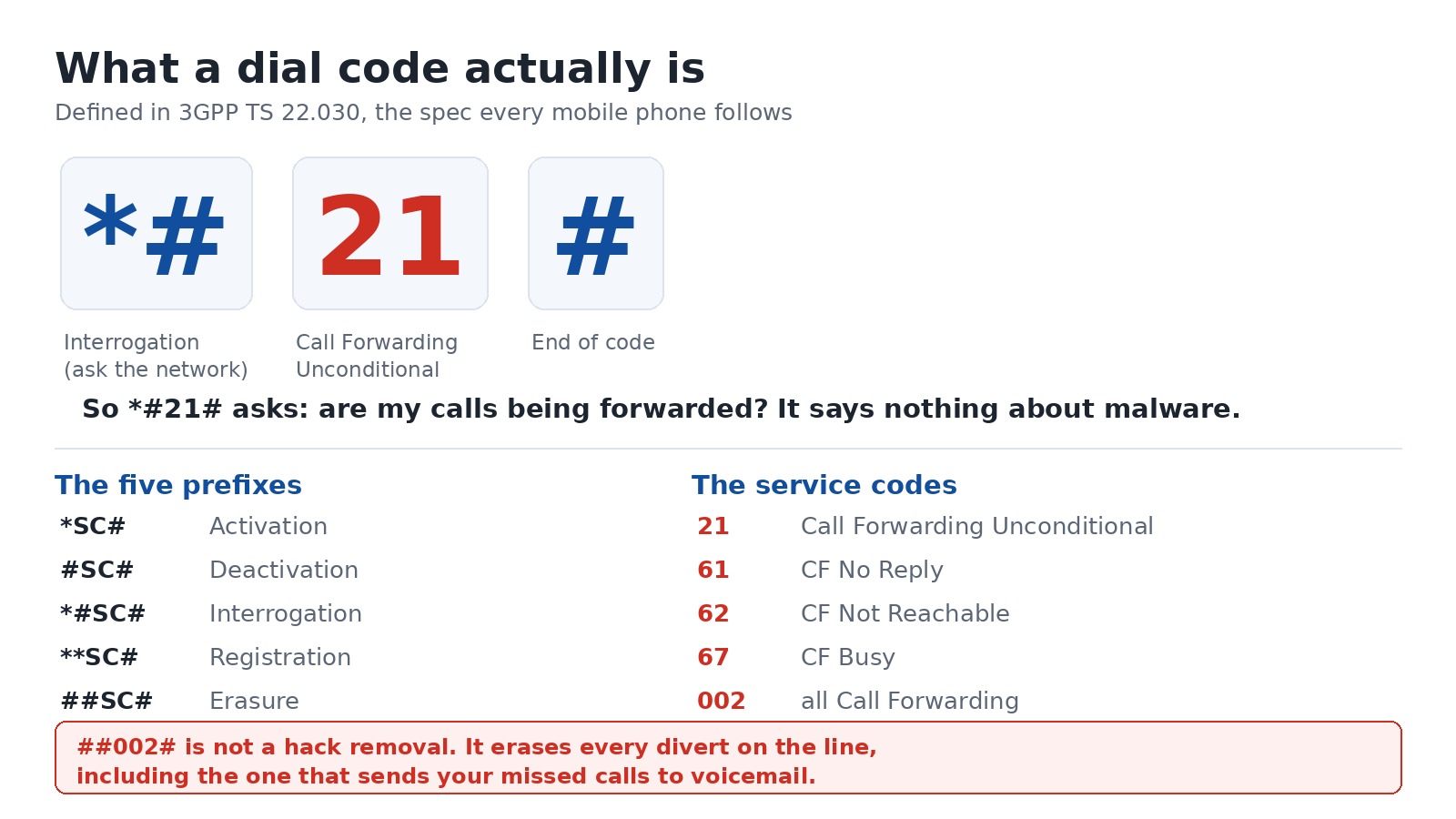
The document is 3GPP TS 22.030, titled “Man-Machine Interface (MMI) of the User Equipment”. We downloaded the current version, V19.0.0, published in October 2025, and read it. Two parts of it settle the whole question.
First, section 6.5.2 sets out what the punctuation means. This is quoted from the specification:
| You dial | The specification calls it | In plain words |
|---|---|---|
*SC# | Activation | Turn this service on |
#SC# | Deactivation | Turn this service off |
*#SC# | Interrogation | Ask the network what the current setting is |
**SC# | Registration | Set it up with a number |
##SC# | Erasure | Wipe the setting completely |
Then Annex B lists what the numbers in the middle stand for. The relevant ones:
| Service code | What it controls |
|---|---|
21 | Call Forwarding Unconditional |
61 | Call Forwarding on No Reply |
62 | Call Forwarding on Not Reachable |
67 | Call Forwarding on Busy |
002 | All call forwarding |
Put the two tables together and the famous codes decode themselves:
*#21#is interrogation of call forwarding unconditional. It asks your network one question: are my calls being sent somewhere else? A result saying forwarding is disabled means your calls are not being diverted. It is not a clean bill of health for your phone.*#62#is the same question about calls that arrive when your phone is off or out of signal. On a UK line this one is often supposed to show a number, because that number is your voicemail service. Vodafone describes the equivalent divert as sending calls to voicemail when you are “busy, unreachable or don’t answer in 15 seconds”.##002#is erasure of all call forwarding.
That last one is the one to be careful with. The articles that tell you to dial ##002# to “remove a hacker” are telling you to wipe every divert on your line, and on a UK network your voicemail is one of those diverts. Vodafone manages voicemail on its call divert help page, tells Pay as you go customers they “can only divert incoming calls to voicemail”, and lists 1211 as the way to “return to the standard voicemail service”. Wipe the diverts and callers can stop reaching your voicemail until it is set up again.
How to tell if your phone has been hacked: the iPhone checks
Apple builds two checks into iOS and neither takes long. Do them in this order.
1. Look for a device management profile. Go to Settings, General, VPN & Device Management. Apple’s guidance is blunt about how to read this screen: “If you don’t see any profiles, then no device management profiles are installed on your device.” An empty screen is what you want. If something is listed that you did not put there, and it did not come from your employer or your school, select it, tap Delete Profile, follow the prompts and restart the phone.
This is the check worth doing first, because a configuration profile is one of the few things that can genuinely change how your phone behaves at a deep level, and installing one needs somebody to have had the phone in their hands.
2. Run Safety Check. Go to Settings, Privacy & Security, Safety Check. It needs iOS 16 or later and an Apple Account with two factor authentication turned on. It shows you, in one place, who you are sharing information with, which apps have which permissions, and which devices are signed into your account. There is an Emergency Reset that stops all sharing at once.
Safety Check has a Quick Exit button in the top right corner of every screen, which closes Settings immediately and keeps any change you already made. Apple put that there for a reason, and it tells you what this feature is really for.
What about Lockdown Mode? It exists, it is in Settings, Privacy & Security, and for almost everyone reading this the answer is to leave it alone. Apple describes it as “an optional, extreme protection” for people who “might be personally targeted by some of the most sophisticated digital threats”, and warns that with it on “your device won’t function like it usually would”. If you are not a journalist, an activist or a diplomat, you do not need it.
Has my phone been hacked? The Android checks
Android does the equivalent job through Google Play Protect, which is already running on your phone.
1. Check Play Protect is on and run a scan. Open the Play Store app, tap your profile icon in the top right, then Play Protect. Google’s documentation says it is on by default, that it “checks your device for potentially harmful apps from other sources”, and that it “may deactivate or remove harmful apps from your device”. You can scan on demand from that screen, and you can confirm the scanning setting under Play Protect Settings.
Google also documents what happens when it finds something: it sends you a notification, and it can disable the app until you uninstall it.
2. Go through your app permissions. Open Settings, Apps, pick an app, then Permissions. What you are looking for is any app holding location, camera or microphone permission with no reason to. Google’s wording for location is worth knowing, because the option called “All the time” means exactly that: “The app can use the permission at any time, even when you’re not using the app.”
3. Look at the app list itself. Scroll the full list rather than your home screen, because an app installed by somebody else will not have left an icon where you would notice it. Anything you do not recognise, search the name before you tap anything.
Spyware on phone: what stalkerware actually looks like
There is a category of phone spying that is genuinely common, and it looks nothing like the films. It is not a remote attacker. It is somebody who knows you, who had your phone and your passcode for a few minutes.
The giveaway is not technical brilliance. It is access. If a person has been alone with your unlocked phone, they can install a tracking app, add themselves to your location sharing, add a management profile, or simply sign into your account on their own device. None of that requires any skill at all, and none of it will be caught by dialling a code.
This is why the official tools are shaped the way they are. Apple’s Safety Check is filed under a guide about personal safety, not under security, and its whole design is about who you are sharing things with and which devices are signed in. That is the vendors telling you where the real risk sits.
What to look for, in order:
- Who is signed into your account. On iPhone, Settings, your name, then the device list. Anything you do not recognise, remove it.
- Who you are sharing location with. Find My on iPhone, Google Maps location sharing on Android. People forget these are on.
- Management profiles and device admin apps, as above.
- Whether your passcode is known. If somebody could have watched you type it, change it. This is the single most effective thing on the page and it takes thirty seconds.
If you are worried about someone in your household and you think changing things might put you at risk, that is a situation worth getting advice on before you start clicking. Apple’s personal safety guide is written with exactly that in mind, which is why it has a Quick Exit button.
Is my phone hacked? What to do in the next ten minutes
If something has genuinely happened, order matters. Do these in sequence rather than all at once, because the first step protects the rest.
- Change the password on your email account first. Not your banking, not your social media. Email, because every other password reset in your life arrives there. Do it from a different device if you can.
- Turn on two factor authentication on that email account if it is not already on.
- Sign out every device you do not recognise in your Apple Account or Google Account.
- Change your phone passcode. Assume the old one is known.
- Run the checks above, profiles and Play Protect, and remove anything you did not put there.
- Install the pending system update. The unglamorous step that closes the actual holes.
- Check your mobile bill for premium rate texts or subscriptions you did not sign up to, and tell your network about any you find.
- Only then consider a factory reset. It is the nuclear option and it is rarely necessary. If you do it, do not restore the same backup straight back onto the phone, or you may restore the problem with it.
What is not on that list: dialling anything, and buying a phone security app. Neither will tell you what the six steps above will.
Reporting it in the UK, and who to call
Most of the advice written about this is American, so the reporting routes it gives you do not exist here. These are the UK ones, and they are free.
| What happened | Where it goes | How |
|---|---|---|
| A suspicious text message | Your mobile network | Forward it to 7726. GOV.UK confirms this is free. |
| A suspicious email | The National Cyber Security Centre | Forward it to [email protected] |
| You have lost money, or been hacked because of a scam, in England or Wales | Report Fraud | Online, or call 0300 123 2040 |
| You have lost money to a scam in Scotland | Police Scotland | Report the crime directly to them |
| A scam or misleading advert | Advertising Standards Authority | Report it online, including adverts in search results |
Reporting a text to 7726 feels like shouting into a void, and it is not. It goes to your own network, which is the organisation that can actually block the sending number for everybody else on it.
One more thing worth doing while you are at it. Ring your bank on the number printed on your card, not a number from a text or an email, and tell them what happened. If a scammer has your details, that call is worth more than everything else on this page.
How to know if my phone is hacked next time, and how to stop it
The reality is that you cannot watch for this continuously, and you should not try. What you can do is make the two things that actually go wrong much less likely.
Fix the account, not the phone. Almost everything people call a hacked phone begins with a password somebody else has. A password manager and two factor authentication on your email account between them remove most of the risk. If you want the version with no password to steal at all, that is what passkeys are for.
Guard the passcode, not the software. The other route in is physical, and it needs your unlocked phone for a couple of minutes. A passcode nobody has watched you type, and a habit of not handing the phone over unlocked, closes it.
Beyond that: keep the operating system updated, install apps from the official stores, and be suspicious of any link that arrives asking you to log in urgently. That is the whole list. It is short because the sophisticated attacks everyone worries about are, as Apple says of the people they target, something most of us will never encounter.
And if you want a quick sanity check every few months, put Safety Check or Play Protect in your calendar rather than a dial code. One of them looks at what is really happening on your phone. The other one asks your network about call diverts.
Quick answers
No. In 3GPP TS 22.030, the specification that defines these codes, *# means Interrogation and service code 21 means Call Forwarding Unconditional. So *#21# asks your network whether your calls are being diverted. It reports on call forwarding and nothing else, and it cannot see software on your phone.
Not with a single test, but you can do the two checks that matter in about a minute. On iPhone, open Settings, General, VPN & Device Management and confirm the list is empty, then run Settings, Privacy & Security, Safety Check. On Android, open the Play Store, tap your profile icon, then Play Protect, and scan. After that, check which devices are signed into your Apple or Google account.
If something is genuinely there, yes, but not by dialling a code. Change your email password first, turn on two factor authentication, sign out unknown devices, change your phone passcode, then remove any profile or app you did not install and take the pending system update. A factory reset is a last resort, and restoring the same backup afterwards can bring the problem back.
It erases all call forwarding on your line. The specification calls ## Erasure and 002 all call forwarding. It does not remove malware. Be careful with it, because on most UK lines one of those diverts is the one that sends your missed calls to voicemail, and wiping it means callers no longer reach your voicemail until it is set up again.
Often, yes, and usually through your accounts rather than the phone. Look at the list of devices signed into your Apple Account or Google Account and remove anything you do not recognise. Then check your location sharing, because a person who had your phone briefly may simply have added themselves rather than installed anything.
Almost never on its own. Battery capacity falls with age, storage filling up slows a phone down, and a major system update can do both on older hardware. On an iPhone, check Settings, Battery, Battery Health and your free storage before you assume anything. Android phones vary on where, or whether, they show battery health at all. Sign-in alerts you did not request are a far more reliable warning sign.
Sources
- 3GPP / ETSI, TS 122 030 V19.0.0 (2025-10), Man-Machine Interface (MMI) of the User Equipment: section 6.5.2 for the Activation, Deactivation, Interrogation, Registration and Erasure prefixes, and Annex B for service codes 21, 61, 62, 67 and 002.
- Apple, Safety Check for an iPhone with iOS 16 or later: the Settings path, the requirements, Emergency Reset and Quick Exit.
- Apple, Review and delete configuration profiles: Settings, General, VPN & Device Management, and how to read an empty list.
- Apple, About Lockdown Mode: who it is for and what it costs you in everyday use.
- Google, Use Google Play Protect to help keep your apps safe: what it scans, that it is on by default, and how to reach the setting.
- Google, Change app permissions on your Android phone: the Settings path and what the “All the time” location option means.
- Vodafone UK, How do I manage call diverts?: a UK network documenting
*#21#as the call forwarding status check,##21#to turn it off, and voicemail itself handled as a divert. - GOV.UK, Avoid and report internet scams and phishing: forwarding texts to 7726, [email protected], and Report Fraud on 0300 123 2040.
- Lead photograph: hands, coffee and smartphone by Pixel.la Free Stock Photos, via Wikimedia Commons, public domain (CC0), cropped to 16:9.
About Hardvance Team
The Hardvance Team is the editorial team at Hardvance, a UK computer and electronics retailer based in Mildenhall, Suffolk. We build and upgrade PCs and sell laptops, phones, networking gear, monitors and printers, and our guides cover the same ground. Every guide names its sources and explains how we checked the figures, and we say plainly when something is our opinion rather than a tested result.
View all posts by Hardvance Team