Free Frames, One Catch: What Is DLSS, DLSS vs FSR, and the DLSS 5 Release Date and Cards
DLSS is Nvidia's way of getting more frames out of the graphics card you already own. It draws the game at a lower resolution, then uses a trained AI model to rebuild the full-size picture. The upscaling part is close to free and you should leave it switched on. The part that needs thought is frame generation, which lifts the number on your frame counter without making the game respond any faster.
Find your situation:
- You keep seeing DLSS in menus and want to know what it isUpscaling, plus three extras. In plain terms
- You want to know if your card supports itEvery RTX card gets the basics. The full table
- Your game runs badly and you want more FPSSuper Resolution first, everything else after. What it does
- You are unsure about frame generationOnly worth it once your frame rate is already decent. On or off
- You have read about DLSS 5It shipped on 1 September 2026, and it is RTX 50 Series only, a list Nvidia extends to the Blackwell graphics inside its new RTX Spark laptop chip. What Nvidia actually said
- You are choosing between Nvidia and AMDThe three-year view changed this summer. DLSS vs FSR
- Your card already runs the game fastThen you want DLAA instead. The difference
Every setting on this page is already sitting in games you own.
- What is DLSS, and what does DLSS stand for?
- How does DLSS work, and what does it do to your frame rate?
- Which DLSS features your card gets
- DLSS frame generation: on or off?
- DLSS 5 release date: it is out, and which cards run it
- DLSS vs FSR, and where Intel XeSS fits
- DLAA vs DLSS: when to use each
- DLSS presets and DLSS Swapper
- How to enable DLSS, and is there a downside?
- Quick answers
What is DLSS, and what does DLSS stand for?
DLSS stands for Deep Learning Super Sampling. In gaming terms it means your card renders fewer pixels than your screen needs, and an AI model trained by Nvidia fills in the rest. That is the whole idea, and the DLSS meaning has not changed since it launched.
Think about what your card is being asked to do at 4K. That is roughly 8.3 million pixels, sixty or more times a second. Now imagine drawing only a quarter of them properly and having something else work out what the other three quarters should look like. You get most of the picture for a fraction of the work.
If you have searched for what is DLSS in gaming and come away more confused than you started, there is a reason. What is Nvidia DLSS, exactly? Not one setting. It is a family, and the name has stayed the same while things were added to it. Today it covers four separate jobs:
- Super Resolution, the DLSS upscaling everyone means when they just say DLSS.
- DLAA, the same model used to clean up edges instead of to save work.
- Ray Reconstruction, which tidies up the noisy mess that ray tracing produces.
- Frame Generation, which invents whole frames between the ones your card drew.
That is also why a list of DLSS games is not one list. A game can offer the upscaling and not the frame generation, or offer an old version of both.
Those four behave very differently, and they are not all available on every card. That difference is the single most useful thing to understand about DLSS, so it has its own section below.
How does DLSS work, and what does it do to your frame rate?
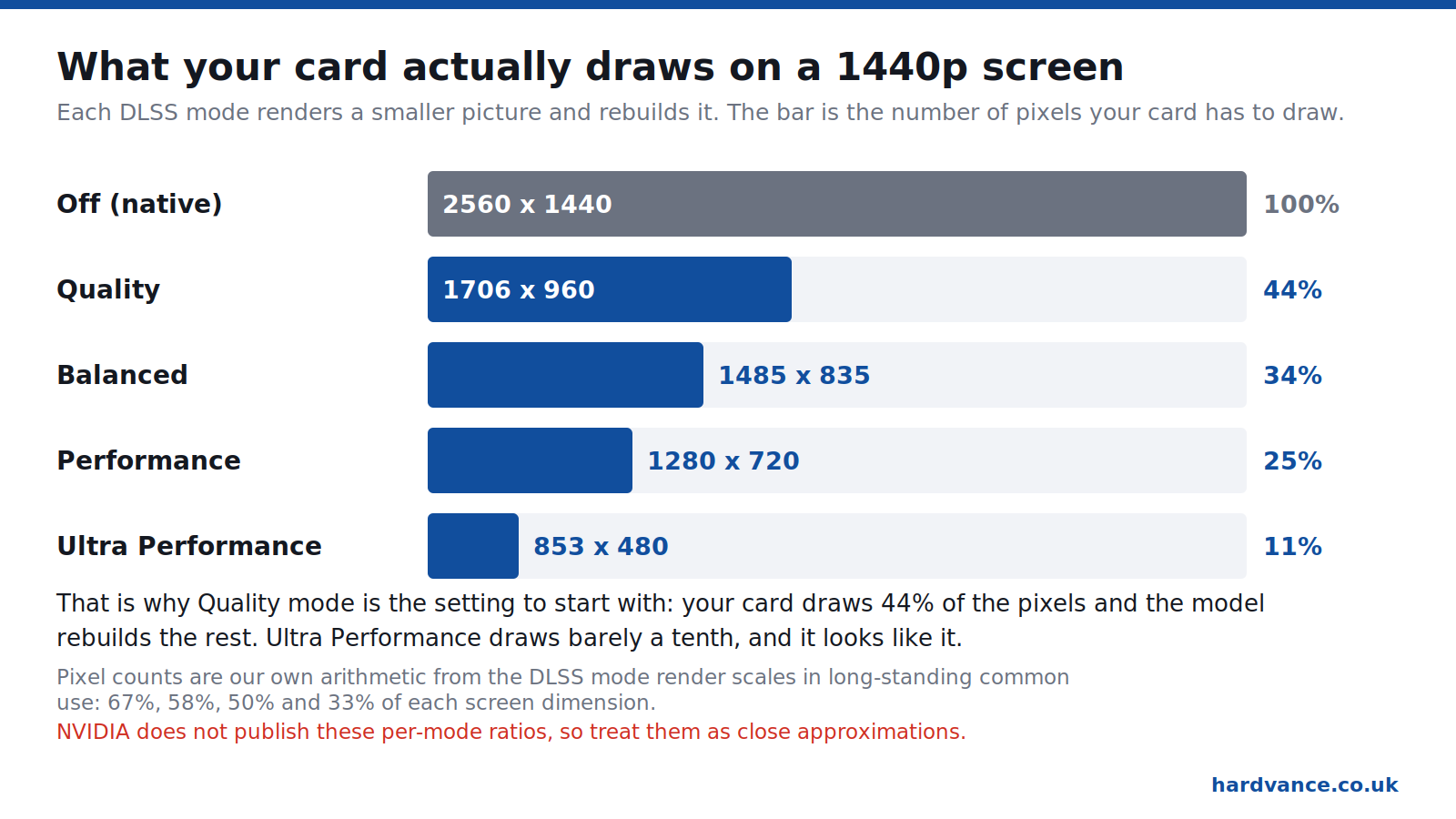
Super Resolution raises your frame rate because your card genuinely does less drawing. Set it to Quality at 1440p and your card renders around 960p, then rebuilds the rest. The saving is real, and so is the frame rate you get back.
The model is not guessing from a single still image. It gets the low-resolution frame, the motion data the game already produces to know which way objects are travelling, and information from the frames before. That is why DLSS holds up in motion where a simple sharpening filter falls apart.
So what is DLSS 4, if you have seen that number and wondered? It is the version where Nvidia switched to what it calls transformer models, and DLSS 4.5 added a second-generation one. In practice the same setting looks better than it did two years ago on the same card. That is unusual, and worth knowing if you last tried DLSS, disliked it, and switched it off for good.
What does DLSS do that you will actually notice? Three things. Your frame rate goes up. Fine detail at a distance, like fences and power lines, is handled better than most alternatives. And you sometimes see a faint trail behind fast-moving objects, which is the model being caught out.
On DLSS vs native, the picture has genuinely changed, and there is a reason that surprises people. Most modern games do not offer you a clean native image. They offer native plus TAA, an older smoothing method that many players find smeary in motion. ComputerBase ran a reader blind test in 2026 and reported that its community preferred DLSS 4.5 to both FSR and native with TAA. Reading the discussion of it, the recurring explanation was not that the upscaler is magic, but that the thing it is being compared against is worse than people remember.
One limit: it cannot rescue a game that is short of processor. If your frame rate is being held back by the CPU rather than the graphics card, drawing fewer pixels changes very little. Our guide to why a PC stutters and crashes while gaming covers how to tell which part is the problem.
Which DLSS features your card gets: RTX 50, 40, 30 and 20
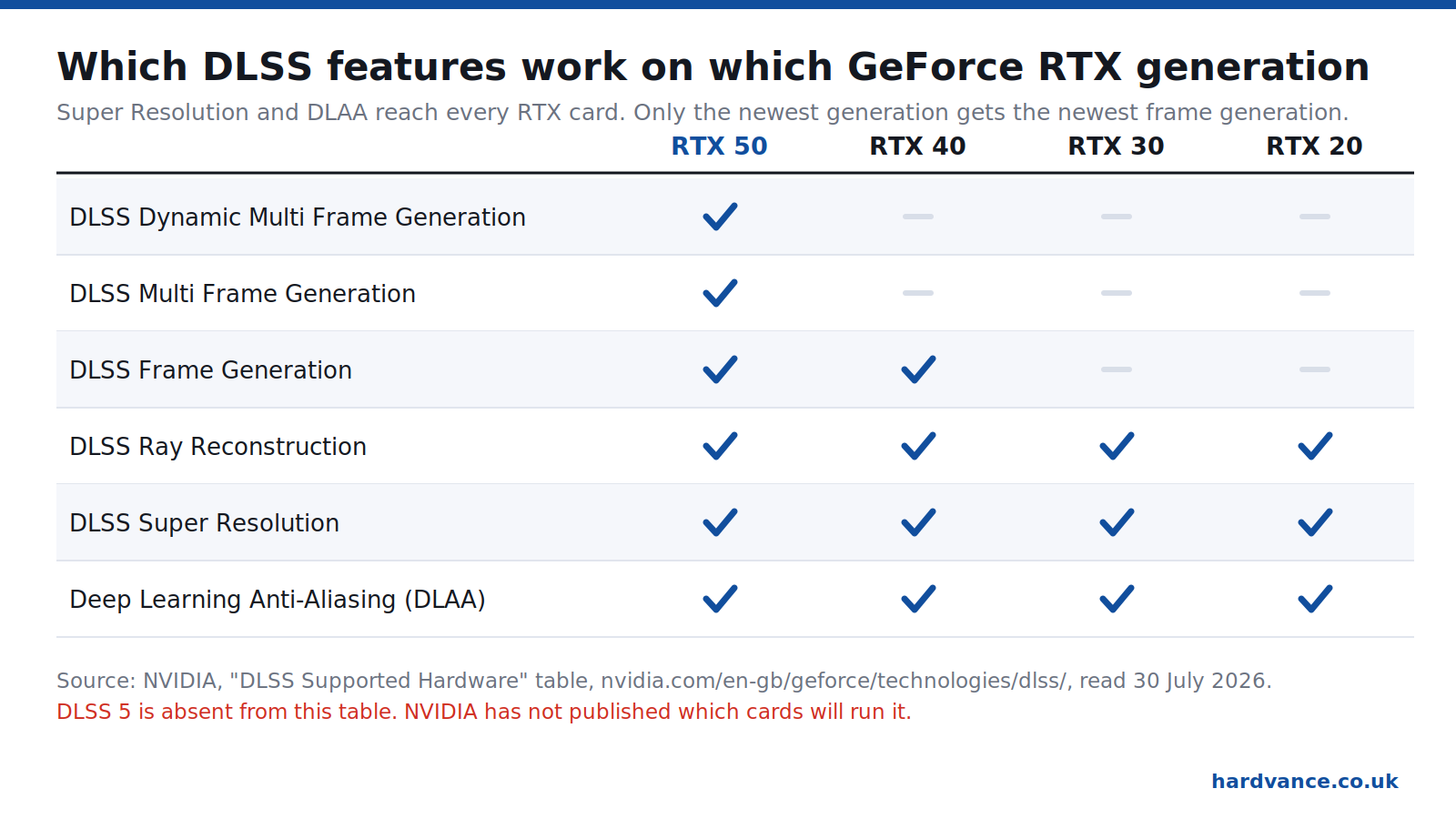
Every GeForce RTX card, going all the way back to the RTX 20 series, gets Super Resolution, DLAA and Ray Reconstruction. Frame Generation needs an RTX 40 or 50. Multi Frame Generation needs an RTX 50. Nvidia publishes this as a table, and it is the answer to most “will DLSS work on my card” questions.
So if you own an RTX 3060 and you have read that DLSS 4 is a new-card feature, that is only half true. You get the improved upscaling model. You do not get the frame multiplication. The upscaling is the part that matters most anyway.
The DLSS 4.5 supported cards list is the same story. In January 2026 Nvidia put DLSS 4.5 Super Resolution on RTX 20, 30, 40 and 50 cards alike. A six-year-old card got a better upscaler for nothing. That is worth remembering next time you read that Nvidia has abandoned older hardware, because on the upscaling side it plainly has not.
If you are still on the DLSS 3 generation of hardware, an RTX 40 card, you also keep Frame Generation. What you miss is the multi-frame version, and Nvidia has not backported that.
What older cards do not get is anything that leans on newer silicon. Multi Frame Generation runs on the fifth-generation Tensor cores in the RTX 50 series, and Nvidia describes it as producing up to three frames for every one your card draws, with up to five signposted as coming.
DLSS frame generation: should you turn it on or off?
Turn frame generation on when your frame rate is already comfortable and you want the motion smoother. Leave it off when your frame rate is poor, and leave it off in competitive shooters. That single rule covers almost every case, and the reason is worth thirty seconds of your time.
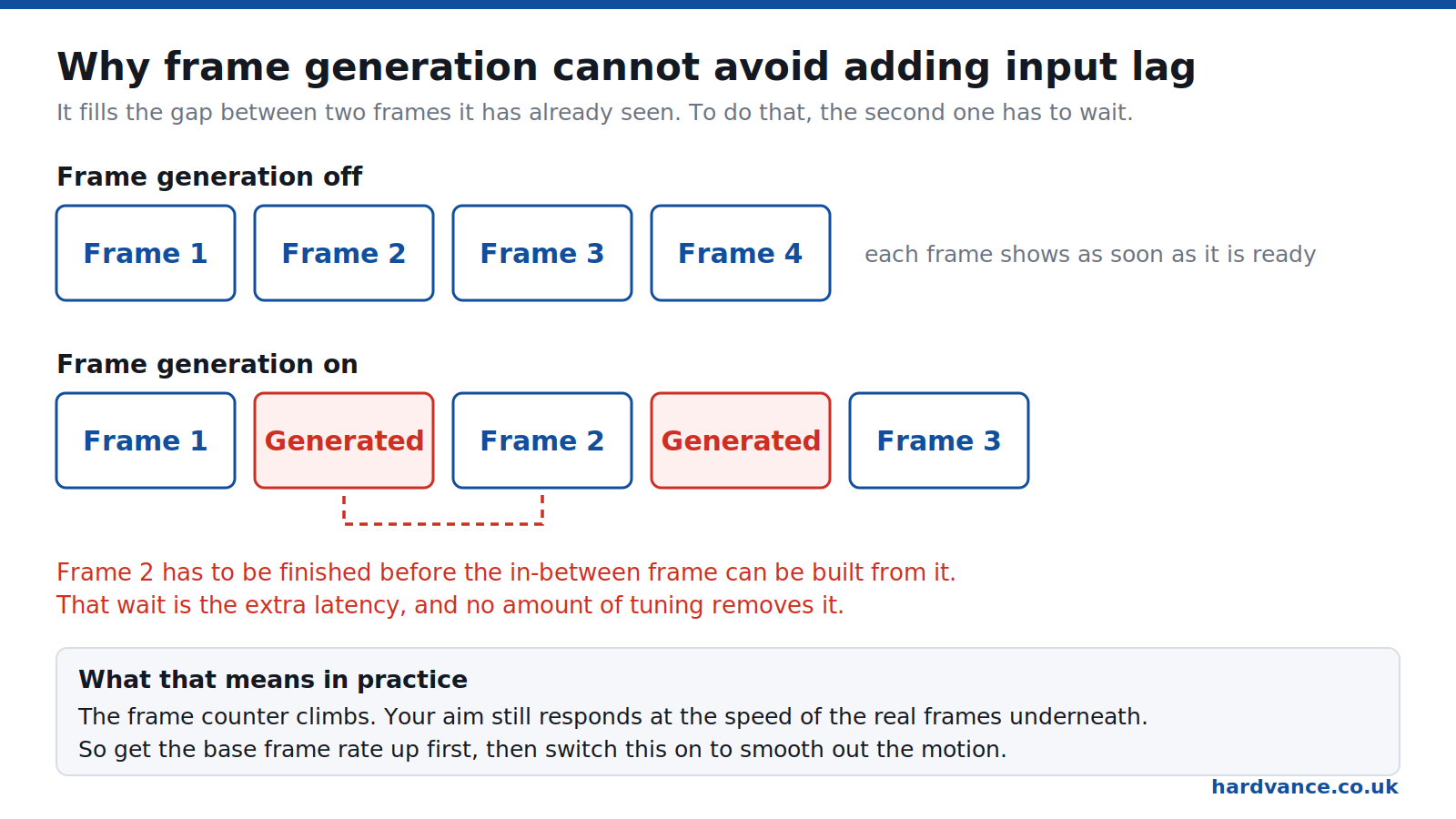
Frame generation is interpolation. It builds a frame that sits between two frames it has already seen. To do that, it has to have seen the second one. So your card finishes frame two, holds it, builds the in-between frame, shows that, then shows frame two. The hold is small, but it is unavoidable. No driver update removes it, because it is how the technique works.
The result is a frame counter that climbs while your aim keeps responding at the speed of the real frames underneath. If your card was drawing 40 real frames a second, your mouse still feels like 40, whatever the counter says.
This works the same way whichever badge is on your card. Nvidia frame generation, AMD frame generation and Intel’s version all interpolate, so they all pay the same toll. So, is frame generation good? Judge the technology by what your frame rate was before you switched it on, not by the badge on the card.
The community argument about this is genuinely unsettled, and the numbers people report are small. In one detailed exchange on r/pcgaming, a player measured 4x frame generation in Cyberpunk 2077 adding about 8ms, for 27ms of total latency, and reported not being able to feel it. Another replied with the arithmetic that 8ms of added delay is roughly the difference between 60 and 41 frames a second in responsiveness. Both are right. Whether it bothers you depends on the game and on you.
Where nearly everyone agrees: get your base frame rate up to something like 60 first. Below that, the generated frames sit between real frames that are far apart, and the artefacts and the sluggishness both become obvious. TechSpot’s conclusion was blunter: frame generation does not fix bad performance.
So, frame generation on or off? On for a single-player game on a high-refresh screen once you are past 60 frames a second, where it makes motion look genuinely smoother. Off in anything competitive. And is frame generation worth it on a card that is already struggling? No. Drop the resolution setting instead.
If you are choosing a screen to pair with this, the refresh rate matters more than the panel marketing does. Our guide on how to choose a gaming monitor goes through what to ignore.
DLSS 5 release date: it is out, and these are the cards
DLSS 5 is no longer a rumour with a season attached to it. Nvidia announced it on 16 March 2026, and it shipped on 1 September 2026. Its first game is NBA 2K27, and Nvidia says it is available “for all GeForce RTX 50 Series GPUs and laptops, and GeForce NOW”. So at launch, DLSS 5 is RTX 50 Series only.
The headline on Nvidia’s article is unambiguous: “NVIDIA DLSS 5 Available Now: 3D-Guided Neural Rendering Debuts In NBA 2K27 For All GeForce RTX 50 Series GPUs, And On GeForce NOW”, published on 1 September 2026. The in-game setting is called DLSS Neural Rendering, and you need a current Game Ready driver: Nvidia shipped 616.64 on 3 September specifically to enable it.
What DLSS 5 actually is. The new part is called 3D-Guided Neural Rendering, and it is a different job from upscaling. Where Super Resolution rebuilds a bigger picture from a smaller one, this uses a neural model to change how light behaves in the scene. Nvidia’s NBA 2K27 example is light passing through a player’s ears and hair and the way skin scatters it, while the scanned facial geometry underneath is preserved.
What it costs in frames. Nvidia’s figures for NBA 2K27 with the Ultra preset and ray tracing: up to 370fps at 4K on an RTX 5090, and at 1440p up to 590fps on the 5090, 410 on the 5080, 350 on the 5070 Ti and 260 on the 5070. Those are Nvidia’s numbers in one sponsored title, not independent testing, so read them as a shape rather than as a benchmark.
And older cards? Nvidia has said which cards it runs on. It has not said anything about whether the RTX 40 or RTX 30 series will get it later. Treat that as unannounced rather than as ruled out, and do not buy on the assumption that it is coming.
This page said something different until 22 September 2026, and it is worth being open about why. Before the launch, the pages claiming DLSS 5 was RTX 50 exclusive were guessing: Nvidia had not said so in the announcement, and its own DLSS technology page still described DLSS 4.5. The guess turned out to be right, but it was still a guess at the time, and we would rather have been slow than lucky.
The practical advice has changed with the facts. If you are buying a card and DLSS 5 matters to you, it is an RTX 50 Series feature today, and one game deep. That is a thin library to spend extra on. If you already own an RTX 40 card, nothing has been taken away from you, and nothing has been promised either.
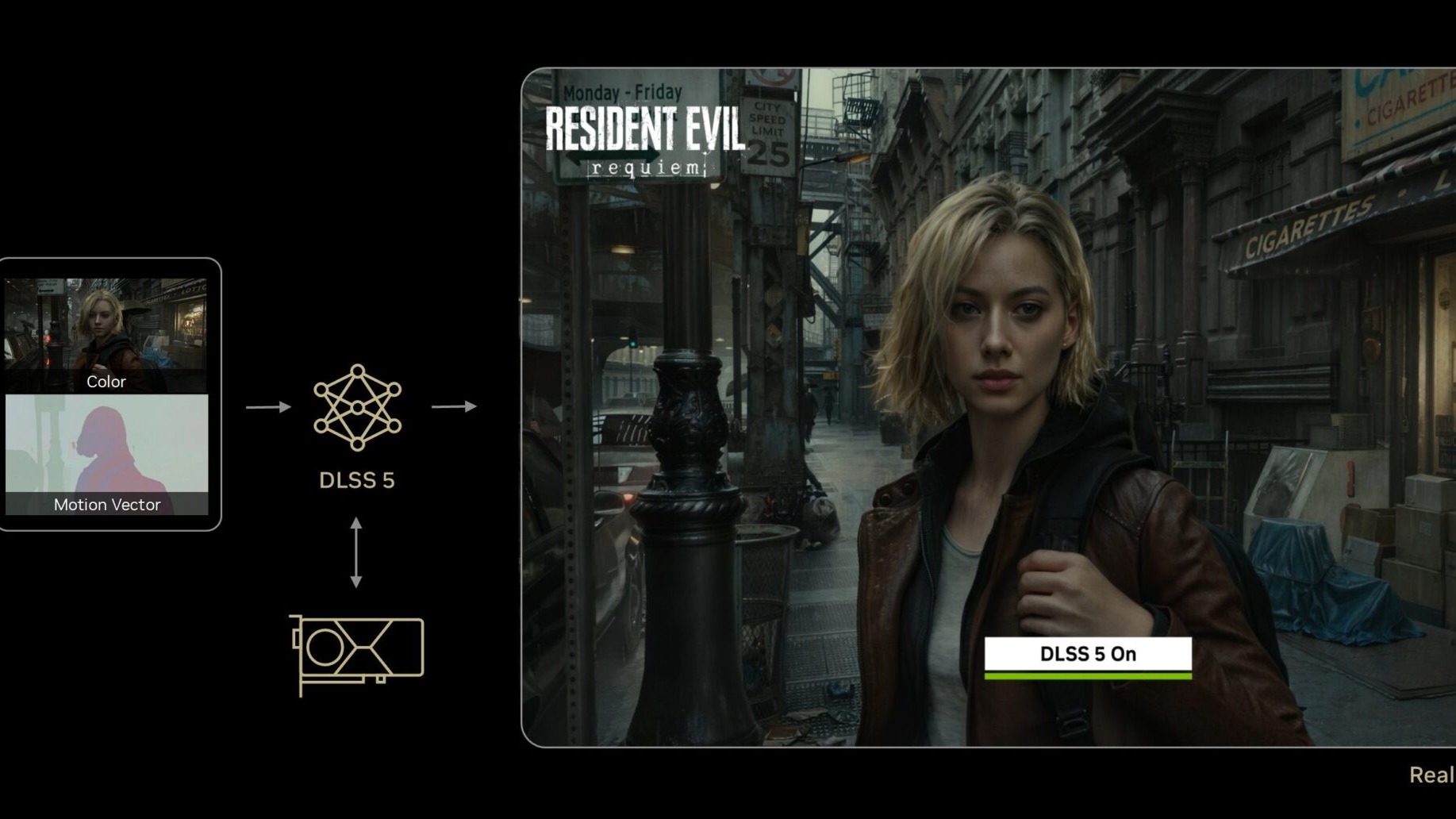
What Nvidia has said about the technology is more interesting than the version number. DLSS 5 is described as a real-time neural rendering model that puts photoreal lighting and materials into the picture, rather than as a better upscaler. Jensen Huang called it “the GPT moment for graphics”. It plugs into games through the same Streamline framework the existing DLSS features use, and Nvidia lists Bethesda, CAPCOM, NetEase, NCSOFT, Tencent, Ubisoft and Warner Bros. Games among the publishers on board, with Resident Evil Requiem, Starfield, Hogwarts Legacy, EA Sports FC and The Elder Scrolls IV: Oblivion Remastered shown running it.
That framing is also why the announcement landed badly with a lot of players. If the model is changing how a scene is lit and surfaced, it is making artistic decisions the studio did not make. The busiest thread about it on r/pcgaming ran past 500 comments, and the technically sharpest argument in it was not that AI in graphics is wrong, but that this is a difference of degree: DLSS always generated pixels, and the question is how much of the original the model keeps. One commenter put it as repainting a mural, where touching up the deer is one thing and turning the deer into a moose is another.
If you are tracking the hardware side of the same generation, we keep the RTX 50 Super release date page updated as that story moves.
DLSS vs FSR, and where Intel XeSS fits
On image quality, DLSS is still generally ahead, and the gap narrowed a lot with FSR 4. On which cards you can use it, AMD and Intel have just moved in the opposite direction to Nvidia, and that changes the calculation if you keep a card for years.
FSR stands for FidelityFX Super Resolution, and it is AMD’s answer to DLSS. What is FSR in gaming terms? The same job, done in a way that is not tied to Nvidia hardware. Intel’s version is XeSS. All three take a lower-resolution frame and rebuild it, so FSR vs DLSS is a comparison of two routes to the same destination rather than of two different features.
Here is the part almost nobody frames properly. Look at the direction of travel over the summer of 2026:
- AMD went backwards, deliberately. FSR 4.1 upscaling started out on RDNA 4 only. AMD’s driver release notes for Adrenalin 26.6.2, dated 22 June 2026, list “AMD FSR Upscaling 4.1 support for AMD Radeon RX 7000 Series Graphics cards” as a new feature. The FSR SDK 2.3 update brings the same image-quality improvements to the older RDNA 3 cards. If you have searched for FSR 4 RDNA 3 and found only rumour, that is the confirmation. Which FSR 4 games you can use it in depends on the game supporting FSR 4 in the first place, so check that before you go looking for the setting.
- Intel went wider still. XeSS 3 adds Multi-Frame Generation, which inserts up to three generated frames between two rendered ones, and Intel lists it across its Arc range rather than reserving it for the newest parts.
- Nvidia’s newest features stayed on the newest cards. Multi Frame Generation is RTX 50 only, and DLSS 5’s requirements are unpublished.
What that means for you is simple enough. If you replace your card every generation, DLSS remains the better software story and it is not close on ray tracing. If you buy a card and keep it for four or five years, AMD has just demonstrated that it will carry new upscaling back to hardware you already bought, and that is worth something real.
AMD’s small print matters too. The 26.6.4 release notes carry a known issue: “Intermittent application crash may be observed in some games with AMD FSR Upscaling 4.1 enabled on Radeon RX 7000 series graphics products.” Backported features are not always finished features.
None of this settles which card to buy, because upscaling is one line in a longer list. Our graphics card guide works through the rest, and the RTX 5060 against the 5060 Ti is the clearest example of memory mattering more than the badge.
DLAA vs DLSS: when to use each
DLSS makes a lower-resolution picture look like your screen’s resolution, to save work. Nvidia DLAA uses the same model at your screen’s full resolution, to make the picture cleaner. DLSS buys frames. DLAA spends them.
What is Nvidia DLAA, then? The DLAA meaning is the giveaway: Deep Learning Anti-Aliasing. Anti-aliasing is about smoothing jagged edges, not about performance, and that is exactly the job it does.
So DLSS vs DLAA is not a question of which is better. It is about what you have spare. If a game already runs at 90 frames a second and your screen is 60Hz or 75Hz, those extra frames are doing nothing for you. Switch on DLAA and spend them on a steadier, cleaner image instead. Shimmering fences, flickering hair and jagged distant edges are what it fixes.
If the game is struggling, do the reverse. DLSS Quality first, and only drop to Balanced or Performance if you still need more.
People often ask about DLAA vs Quality mode specifically, which is the closest comparison. DLAA vs DLSS Quality will look better on the DLAA side, because it starts with more real pixels, and it will cost you frames rather than give you any. On a card that is comfortably ahead of the game, that is a good trade.
On DLAA vs TAA, the older temporal anti-aliasing most games ship with: DLAA is the better of the two in almost every case. TAA is what people mean when they complain that modern games look smeary in motion. If a game offers both, there is little reason to choose TAA.
DLAA is available on every RTX generation, so this is not a new-card feature. If your card is stronger than your monitor, you have probably been leaving it unused.
DLSS presets and DLSS Swapper: changing the model yourself
DLSS ships as a file inside each game, so games can be stuck on an old version. Tools like DLSS Swapper replace that file with a newer one, and the Nvidia app can now force newer models and presets without touching game files.
The DLSS 4.5 presets are named with single letters, which is not helpful of Nvidia but easy enough once you know. Each letter is a different trained model with different behaviour around ghosting and sharpness. Nvidia’s guidance points at one model for the higher quality modes and others for the more aggressive performance modes.
The file itself is a DLSS DLL sitting in the game’s folder, which is why this is possible at all. A tool acting as a DLSS updater simply drops a newer copy of that file in place of the one the developer shipped.
Hardware Unboxed’s video on which DLSS configuration to use is worth your time if you want to go deeper, and the discussion under it is genuinely instructive. The recurring complaint is that the model Nvidia recommends for Quality mode shows more ghosting than people would like, while the models that handle that better cost more performance. There is no single right answer, which is exactly why the setting exists.
Practical advice: leave it alone unless something is bothering you. If you are seeing trails behind moving objects, or the image looks oversharpened and crunchy, that is when swapping the model is worth trying. Start with the Nvidia app, since it does not modify the game.
One caution. Replacing files inside a game is fine in single-player. In anything with anti-cheat, do not. Use the driver-level override instead.
How to enable DLSS, and is there a downside?
DLSS lives in the game’s own graphics settings, usually under an upscaling or image-quality heading. You need an Nvidia RTX card and a current driver. If the option is greyed out or missing, the game does not support it, and no setting elsewhere will add it.
That is all there is to how to turn on DLSS. There is no driver-wide switch that forces it into a game that was never built for it, whatever a search result might promise you.
How to enable DLSS 5
DLSS 5 is a separate setting from the upscaler, and it has its own requirements. To enable DLSS 5 you need three things at once:
- A GeForce RTX 50 Series card, desktop or laptop, or a GeForce NOW Ultimate membership. Nothing older runs it today.
- A current Game Ready driver. Nvidia shipped 616.64 on 3 September 2026 to enable DLSS 5, so anything from that release onwards will do.
- A game that supports it. So far that means NBA 2K27, which is where it launched.
With all three in place, the switch is in the game’s own graphics settings and it is labelled DLSS Neural Rendering rather than DLSS 5. If you cannot find that line, one of the three requirements above is missing, and no driver setting will conjure it.
How to use DLSS well is a slightly longer answer. The order that works, if you are starting from a game that runs badly:
- Turn on DLSS Super Resolution and set it to Quality.
- If you need more, step down to Balanced, then Performance. Stop as soon as it looks wrong to you.
- If the game has ray tracing on, turn on Ray Reconstruction. It usually improves the picture and costs little.
- Only once you are happy with the frame rate, consider frame generation.
Is DLSS good? For the upscaling, yes, and you can treat it as a default. The downsides are real but modest, and you should know them:
- Trailing and ghosting behind fast objects, worse at the aggressive settings.
- Softness or oversharpening depending on the model and on what the game does afterwards.
- Thin detail wobbling, such as wires and railings, though this is much better than it used to be.
- Latency, but only from frame generation. Super Resolution on its own tends to reduce latency, because a faster frame rate means a shorter wait for the next frame.
We have not shot our own DLSS comparison stills, and you should be wary of anyone who has done it casually, because these differences show up in motion rather than in screenshots. For a proper DLSS 5 comparison, and for the older versions, Digital Foundry and Hardware Unboxed do this work frame by frame and publish the footage.
One more comparison worth knowing if you play a lot of Unreal Engine games. On TSR vs DLSS, TSR is Epic’s own upscaler built into the engine, and it works on any card. It is a reasonable fallback, and DLSS is usually the better of the two on an RTX card, so pick DLSS where the game offers both.
If your frame rate is poor and DLSS barely helps, the bottleneck is probably somewhere else. Our slow-computer guide and the gaming laptop guide both cover the usual culprits, and on a laptop the answer is very often heat rather than the graphics chip.
Quick answers
On, for the upscaling part. DLSS Super Resolution at Quality gives you a meaningful frame rate increase for a very small cost in image quality, and on modern models many people cannot reliably tell it apart from native. Frame generation is the setting to be selective about: leave that off in competitive shooters and off if your frame rate is already low.
It renders the game at a lower resolution than your screen and uses an AI model to rebuild the full-size image, so your card does less work for a similar-looking result. The same family of technology also cleans up edges (DLAA), tidies ray-traced lighting (Ray Reconstruction) and creates extra frames between rendered ones (Frame Generation).
A few, all modest. You can see faint trails behind fast-moving objects, thin details like wires can shimmer, and depending on the model the picture can look either slightly soft or slightly oversharpened. Frame generation adds input latency, which the plain upscaling does not.
Yes, when the graphics card is what is holding you back. Rendering fewer pixels is genuinely less work, so the frames come faster. It helps much less if your processor is the limit, because the number of pixels is not the problem in that case.
At launch, the GeForce RTX 50 Series only. Nvidia's announcement of 1 September 2026 says DLSS 5 is available "for all GeForce RTX 50 Series GPUs and laptops, and GeForce NOW". Nothing older is supported today, and Nvidia has not said whether that will change.
Not at the moment. DLSS 5 launched on 1 September 2026 for the RTX 50 Series and GeForce NOW, and the RTX 40 Series was not included. Nvidia has not announced support for it and has not ruled it out either, so treat it as unannounced rather than promised, and do not buy a card on the strength of it.
On image quality, generally no: DLSS is still ahead, though FSR 4 narrowed the gap considerably. On availability, AMD now has the better story, because it carried FSR 4.1 upscaling back onto older Radeon RX 7000 cards while Nvidia's newest frame generation stayed on the RTX 50 series.
Both cost a little performance to run, which is why the very fastest settings are not free. DLSS runs on dedicated Tensor cores in RTX cards, so the cost is handled by hardware that would otherwise be idle. The practical difference is small compared with the difference in how the two look.
Nvidia makes DLSS. FSR is AMD's. Because FSR is not locked to one brand of hardware, though, an Nvidia card can usually run FSR in a game that offers it, which is useful when a game supports FSR and not DLSS.
DLAA is Deep Learning Anti-Aliasing. It uses the same AI model at your screen's full resolution to produce a cleaner, steadier image, instead of using it to save work. It looks better than DLSS and costs you frames rather than giving you any, so it suits a card that is already comfortably fast for the game.
Super Resolution does not, and often reduces it slightly, because a higher frame rate shortens the wait for the next frame. Frame generation does add latency, and this is unavoidable rather than a bug: it has to hold a finished frame back in order to build the in-between one from it.
Rendering internally at a lower resolution generally reduces the memory needed for the frame itself, so plain upscaling tends to help a little. Frame generation pushes the other way, because generated frames have to be stored. If you are short of video memory, upscaling is the friend and frame multiplication is not.
Related reading
- Best graphics card in 2026: the 8GB trap and what to buy instead
- RTX 5060 vs RTX 5060 Ti: the memory matters more than the Ti
- RTX 5080 Super release date: why the launch is on hold
- How to choose a gaming monitor: ignore the 1ms, buy the refresh rate
- Why your PC crashes, freezes or restarts while gaming
Sources
- NVIDIA, “NVIDIA DLSS 5 Available Now: 3D-Guided Neural Rendering Debuts In NBA 2K27 For All GeForce RTX 50 Series GPUs, And On GeForce NOW”, 1 September 2026. The launch date, the supported cards, the GeForce NOW support and the NBA 2K27 frame rate figures.
- NVIDIA, GeForce Game Ready Driver 616.64, 3 September 2026. The driver release that enables DLSS 5.
- NVIDIA, “NVIDIA DLSS 5 Delivers AI-Powered Breakthrough In Visual Fidelity For Games”, 16 March 2026. The “will arrive this Fall” wording, the neural rendering description, the Jensen Huang quotation and the publisher list.
- NVIDIA, DLSS technology page, read 30 July 2026. The “DLSS Supported Hardware” table used for our feature chart, and the Multi Frame Generation and DLSS 4.5 descriptions. Note that this page does not mention DLSS 5.
- AMD, Adrenalin Edition 26.6.2 release notes, 22 June 2026. FSR Upscaling 4.1 support for Radeon RX 7000 series.
- AMD, Adrenalin Edition 26.6.4 release notes. The known issue about intermittent crashes with FSR 4.1 on RX 7000 cards.
- AMD GPUOpen, “AMD FSR Upscaling 4.1 RDNA 3 Support Now Available in FSR SDK 2.3 Update”. The RDNA 3 backport.
- Intel, Arc Gaming Technologies. XeSS 3 feature list and the up-to-three generated frames figure for XeSS Multi-Frame Generation.
- r/pcgaming, discussion of Techspot’s “Frame Generation Doesn’t Fix Bad Performance”. The measured Cyberpunk 2077 latency figures and the disagreement about whether they matter.
- r/pcgaming, “Nvidia Confirms DLSS 5 Is Re-Drawing Games”. The difference-of-degree argument and the mural analogy.
- r/pcgaming, discussion of Hardware Unboxed on DLSS preset choice. The ghosting-versus-performance trade in the preset models.
- r/pcgaming, discussion of ComputerBase’s 2026 reader blind test, which found readers preferred DLSS 4.5 to FSR and to native with TAA. The explanation about TAA comes from that discussion.
About Hardvance Team
The Hardvance Team is the editorial team at Hardvance, a UK computer and electronics retailer based in Mildenhall, Suffolk. We build and upgrade PCs and sell laptops, phones, networking gear, monitors and printers, and our guides cover the same ground. Every guide names its sources and explains how we checked the figures, and we say plainly when something is our opinion rather than a tested result.
View all posts by Hardvance Team