



-
 Buy now, pay later with Klarna at checkout
-
 Pay in 3 interest-free payments with PayPal at checkout



£251.29 inc VAT
In stock
In stock
Buy now, pay later with Klarna at checkout
Pay in 3 interest-free payments with PayPal at checkout
Payment Methods:
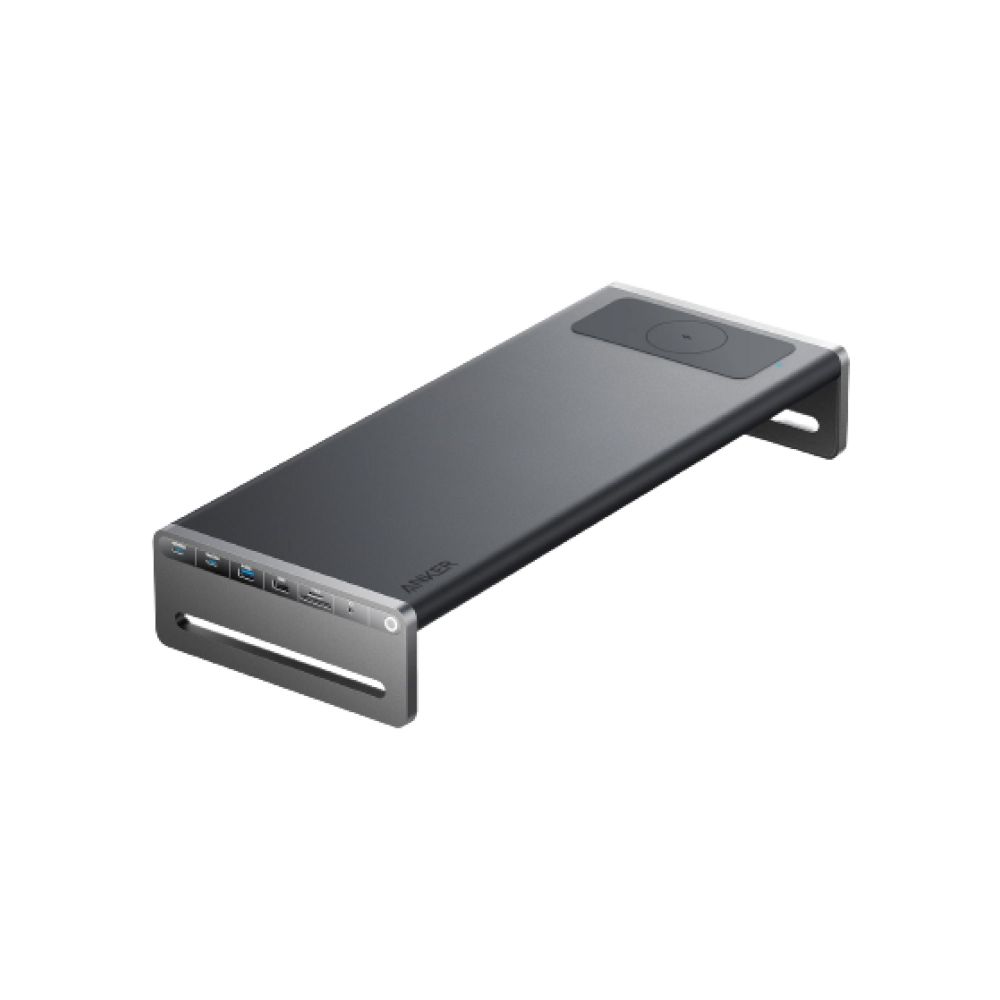
The Anker A83772Z1 laptop dock/port replicator Docking USB 3.2 Gen 1 (3.1 Gen 1) Type-C Black is a wired docking solution for modern laptops. It suits UK professionals seeking a single-cable setup for power, display, and data. The key USP is the integrated aluminium stand, which elevates your monitor to eye level. This helps reduce neck strain during long work sessions. It connects via a USB 3.2 Gen 1 Type-C host interface. This dock supports Windows 10, Windows 11, and ChromeOS.
| Metric | Spec. |
|---|---|
| Host Interface | USB 3.2 Gen 1 Type-C |
| HDMI Ports | 1 |
| Ethernet LAN | 1 x RJ-45 (1000 Mbit/s) |
| USB-A Ports | 3 (USB 3.2 Gen 1) |
| USB-C Ports | 2 (USB 3.2 Gen 1) |
| Weight | 3.22 kg |
The built-in stand keeps your monitor at eye level. This supports a neutral neck posture. You avoid slouching during extended work. The aluminium housing adds durability. It also aids heat dissipation. In practice, this creates a cleaner, more organised desk.
This dock offers one HDMI port for video. It also has one Gigabit Ethernet RJ-45 port for stable networking. You get three USB 3.2 Gen 1 Type-A ports. There are also two USB 3.2 Gen 1 Type-C ports. This mix supports fast file transfers and peripheral connections. However, the host device must support DisplayPort Alt Mode for video output.
USB Power Delivery is supported. The dock can deliver up to 100W to your laptop. This depends on your laptop’s power requirements. It also features 10W wireless charging for your phone. So, you can power two devices from one station. Always verify your laptop’s charging needs before purchase.
An integrated card reader supports multiple formats. These include SD, SDHC, SDXC, and MicroSD variants. This is useful for photographers and videographers. A cable management system sits on the underside. It keeps cables tidy and out of the way. This reduces desk clutter.
The dock supports Windows 10 and Windows 11. It also supports ChromeOS. Linux support is not stated in this listing. If you use Linux, confirm compatibility with your distribution. The host interface is USB 3.2 Gen 1 Type-C. Ensure your laptop has a USB-C port with data and power support.
This dock is suited to UK professionals who need a single-cable setup. It benefits those who value ergonomics and cable tidy. It suits Windows and ChromeOS users with USB-C laptops. It is not ideal for Mac users without confirmed compatibility. Covered by the applicable manufacturer warranty.
| USB 3.2 Gen 1 3.1 Gen 1 Type-A ports quantity | 3 |
|---|---|
| USB 3.2 Gen 1 3.1 Gen 1 Type-C ports quantity | 2 |
| Host interface | USB 3.2 Gen 1 (3.1 Gen 1) Type-C |
| Ethernet LAN RJ-45 ports | 1 |
| HDMI ports quantity | 1 |
| Microphone in | No |
| Headphone outputs | 1 |
| DC-in jack | Yes |
| USB Power Delivery | Yes |
| Ethernet LAN data rates | 1000 Mbit/s |
| Product colour | Black |
| Card reader integrated | Yes |
| LED indicators | Charging |
| Compatible memory cards | MicroSD (TransFlash), MicroSDHC, MicroSDXC, SD, SDHC, SDXC |
| Housing material | Aluminium |
| Power source type | DC, USB |
| Wireless charging power | 10 W |
| Wireless charging | Yes |
| Windows operating systems supported | Windows 10, Windows 11 |
| Other operating systems supported | ChromeOS |
| Weight | 3.22 kg |
| Width | 540 mm |
| Depth | 220 mm |
| Height | 90 mm |
| Distributor SKUs | CLA83772Z1 |
No account yet?
Create an Account
Reviews
Clear filtersThere are no reviews yet.