Keychron K2 HE Review: Magnetic Switches, Gaming, Battery Life, UK Layout and Version 1 vs 2
The Keychron K2 HE is one of the best 75% keyboards you can buy if you want one board for both typing and gaming. Its magnetic switches let you set how deep each key fires, from 0.2mm to 3.8mm, and add rapid trigger for shooters. Tom’s Hardware gave the Special Edition its Editor’s Choice award and called its switches about the smoothest it had used. The limits: it only takes Gateron’s double-rail magnetic switches, it has no volume knob, and wireless polling stops at 1,000Hz.
Jump to your question:
- Is the K2 HE worth it?Yes, for typing and gaming. Verdict
- What do magnetic switches do?Explained
- Is it good for gaming?Gaming
- How long does the battery last?Battery
- Special Edition or Standard?The difference
- Is there a UK layout?Yes. UK ISO
We did not lab-test the K2 HE. Typing, gaming and battery findings come from Tom’s Hardware, APH Networks and TechWeLike, and specifications and prices from Keychron’s own sites, read on 8 October 2026. We sell the K2 HE Special Edition in the UK layout.
- Keychron K2 HE review: the verdict
- How the Keychron K2 HE wireless magnetic switch keyboard works
- Keychron K2 HE typing feel and sound
- Keychron K2 HE for gaming
- Keychron K2 HE software: the Launcher web app
- Keychron K2 HE battery life
- Keychron K2 HE Special Edition vs Standard, and Version 1 vs 2
- Keychron K2 HE UK layout and price
- Who should not buy the Keychron K2 HE keyboard
- Quick answers
The K2 HE we sellThe Special Edition with wood sides and the UK ISO layout, in black (K2H-F1-UK) and white (K2H-Q1-UK). Each product page shows the current price.
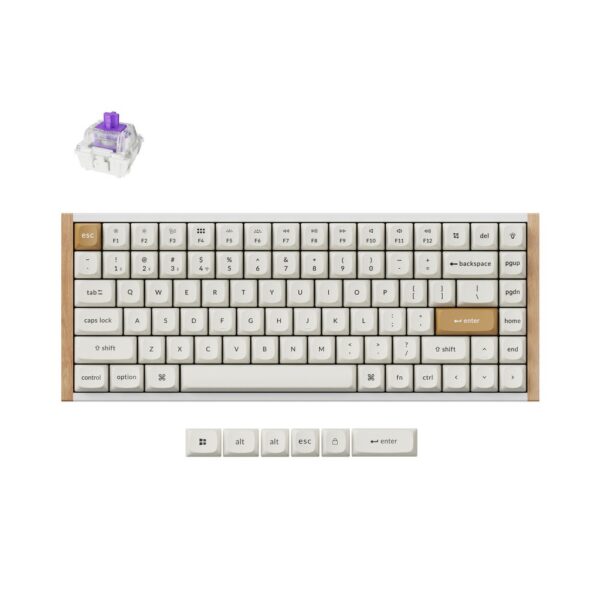
Keychron K2 HE 75% Wireless RGB Gaming Keyboard – Magnetic-Mechanical Switches, UK English, White
In stock
- Magnetic-mechanical switches with 150 million character operating life
- 75% form factor (84 keys), UK English QWERTY layout
- Wired and wireless connectivity (USB Type-C, RF Wireless, Bluetooth 5.2)
- RGB LED backlight with multicolour options and adjustable height
- 4000 mAh LiPo battery, up to 110 hours battery life
- Multi-device support for Windows, Mac, and Linux
- Hot-swappable design with Gateron Double-Rail Magnetic Switches
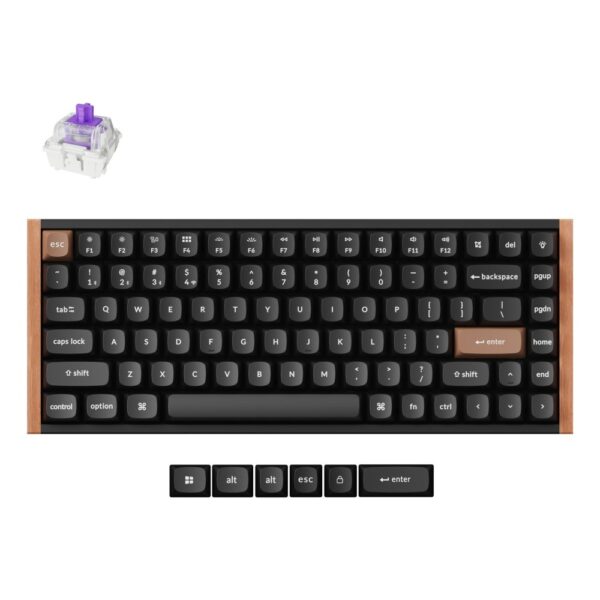
Keychron K2 HE Wireless Gaming Keyboard, 75% Layout, Magnetic Switch, RGB, UK English, Black
In stock
- Magnetic-mechanical switches with adjustable actuation from 0.2 to 3.8 mm
- Wired, 2.4 GHz RF Wireless, and Bluetooth 5.2 connectivity with 1000 Hz polling rate
- 75% layout, UK English QWERTY keyboard with N-key rollover and RGB backlight
- Dynamic Rapid Trigger, Last Key Priority (LKP), and Analog Mode for gaming precision
- Multi-device support and hot-swappable Gateron Double-Rail Magnetic Nebula switches
- QMK open-source firmware with Keychron Launcher for customisation
- Up to 110 hours battery life from a 2000 mAh built-in LiPo battery
Keychron K2 HE review: the verdict
Buy the K2 HE if you type all day, game in the evening and want a keyboard that looks like furniture rather than a gaming accessory. Skip it if you want clicky or tactile switches, or a very high polling rate for competitive esports.
Three reviewers who used it for weeks reached the same conclusion. Tom’s Hardware gave it an Editor’s Choice award and called it “the prettiest keyboard I’ve ever tested”. APH Networks scored it 7.6 out of 10 and praised its build, its magnetic switch features and how easy it is to repair. TechWeLike called it “a great keyboard for the mature gamer”. Keychron says it is the only keyboard to win a CES 2025 Innovation Award.
- Good: very smooth, quiet linear switches; adjustable actuation and rapid trigger on every key; three wireless devices plus wired; works on Mac and Windows; browser-based software; the wood sides look superb.
- Not so good: only Gateron double-rail magnetic switches fit; no volume knob; the Special Edition keycaps do not let the backlight through.
| Keychron K2 HE | Specification |
|---|---|
| Layout | 75%, with function row and arrow keys |
| Switches | Gateron Double-Rail Magnetic Nebula, hot-swappable |
| Actuation | Adjustable from 0.2mm to 3.8mm in 0.1mm steps; rapid trigger |
| Connections | 2.4GHz wireless, Bluetooth 5.2 (three devices), USB-C wired |
| Polling rate | 1,000Hz wired and on 2.4GHz |
| Battery | 4,000mAh, up to 110 hours (Keychron) |
| Software | QMK firmware, Keychron Launcher web app |
| Build (Special Edition) | Aluminium and plastic body with solid wood sides; OSA double-shot PBT keycaps |
How the Keychron K2 HE wireless magnetic switch keyboard works
Normal mechanical switches fire at one fixed point. The K2 HE’s magnetic switches measure how far each key is pressed, so you choose where it fires and can make one key do several things.
HE stands for Hall effect, the name for this type of magnetic keyboard. The Version 1 models we sell go a step further, with a TMR sensor under every key that Keychron says is more precise. Either way there is no metal contact inside, so nothing wears out from rubbing. Here is what that gives you:
- Adjustable actuation: set each key to fire anywhere from 0.2mm to 3.8mm, in 0.1mm steps. Shallow for fast gaming, deeper if you have heavy hands and make typos.
- Rapid trigger: the key resets the moment you start lifting your finger, not at a fixed point. In shooters this makes stopping and strafing feel instant.
- Several actions per key: TechWeLike describes pressing W lightly to walk and fully to sprint, with up to four actions on one key.
- Analogue gamepad mode: Keychron says the keys can act like a controller joystick, based on how deep you press.
Keychron K2 HE typing feel and sound
This is where the K2 HE surprises people. Tom’s Hardware’s reviewer, a long-time fan of clicky switches, found its linear switches “about the smoothest I’ve ever used” and preferred them to a Corsair K65 Plus fitted with tactile switches.
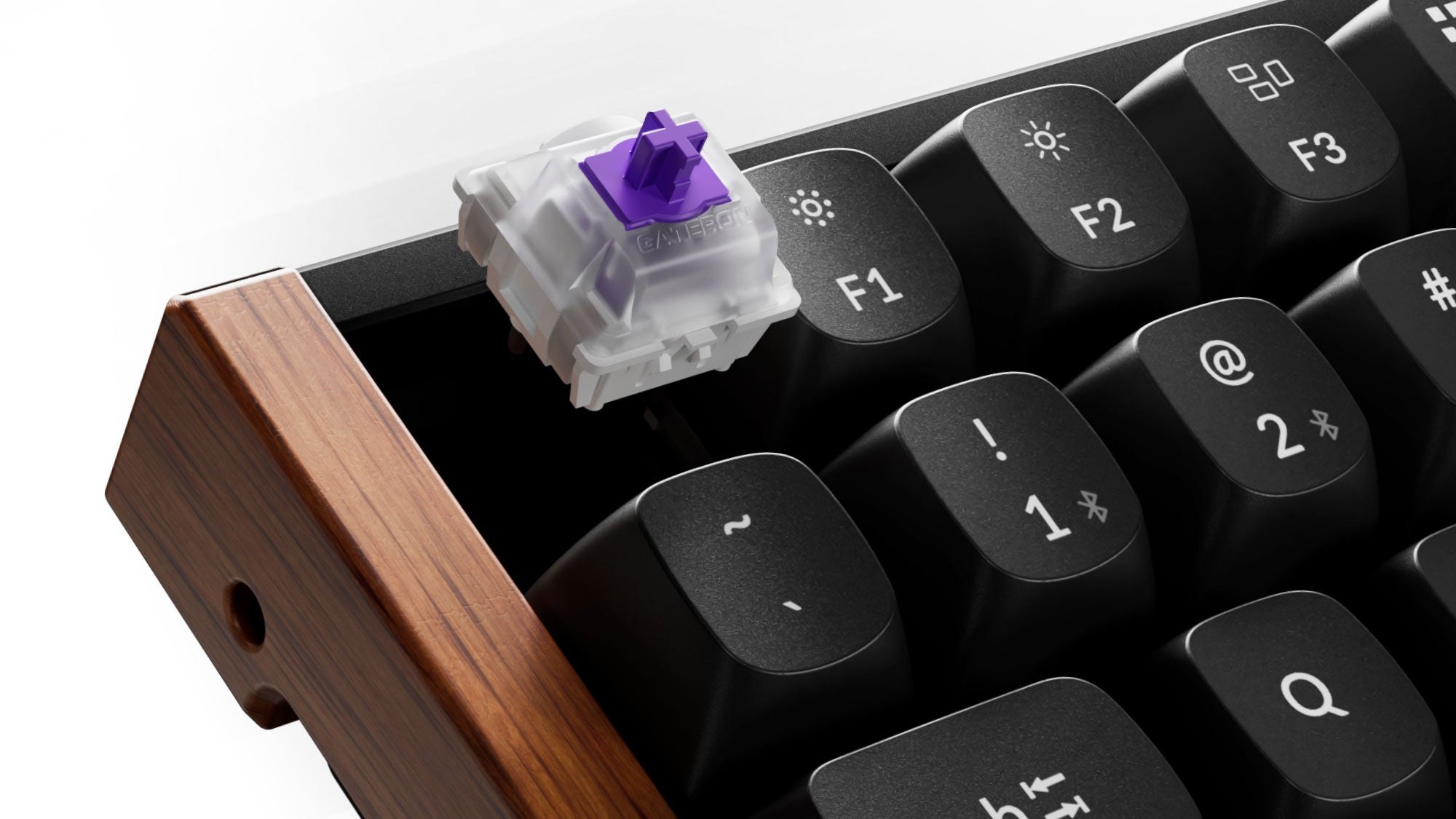
The switches come pre-lubricated, and Keychron fills the case with several layers of foam and a silicone pad. TechWeLike described the result as muted and premium, not clacky. The Gateron Double-Rail design uses two plastic rails to stop the key wobbling, and the big keys use screw-in stabilisers, which Tom’s Hardware found kept them steady.
All the switches are linear, so there is no bump or click. If you love that tactile feedback, this is not your keyboard. Our mechanical vs membrane keyboards guide explains the switch types.
Keychron K2 HE for gaming
For most gamers it is excellent: rapid trigger and adjustable actuation are the features that matter in shooters, and Tom’s Hardware said its magnetic switches “offer next-level gaming options”. Competitive esports players may want a keyboard with a higher polling rate.
The K2 HE reports to your PC 1,000 times a second, wired or over the 2.4GHz dongle. Keychron says the keyboard’s latency performed very well in RTINGS’ testing. TechWeLike noticed no lag in games, and Tom’s Hardware had no connection problems using the dongle.
Keychron also lists Last Keystroke Prioritisation, which makes the most recent of two opposite keys win, so pressing A while holding D moves you left straight away. Some newer magnetic keyboards poll at 8,000Hz, but at 1,000Hz each report arrives within a millisecond, which very few players can feel.
Keychron K2 HE software: the Launcher web app
There is nothing to install. You set everything up in Keychron Launcher, a web app that runs in Chrome, Edge or Opera, with the keyboard plugged in by cable.
Tom’s Hardware found it refreshing compared with the bulky apps most brands use. You can remap keys, record macros, change the lighting and set actuation for each key. Changes save to the keyboard straight away, across three on-board profiles, so they follow you to other computers. One limit Tom’s Hardware hit: the multi-action key feature works with normal keys and macros but not with media controls. The K2 HE also runs QMK open-source firmware and works with VIA, according to APH Networks.
Keychron K2 HE battery life
Expect one to two weeks of normal use between charges, depending on how much you use the backlight. Keychron quotes up to 110 hours from the 4,000mAh battery.
- Tom’s Hardware: nearly two weeks of work and gaming with the backlight on about 20% of the time, without charging.
- TechWeLike: about a week and a half with the RGB lighting on.
- APH Networks: measured 28 hours in its own runtime test and called it “pretty good”.
The gap between those numbers comes down to lighting and hours of use. Turn the backlight off and it lasts much longer. You can also keep using it while it charges over USB-C.
Keychron K2 HE Special Edition vs Standard, and Version 1 vs 2
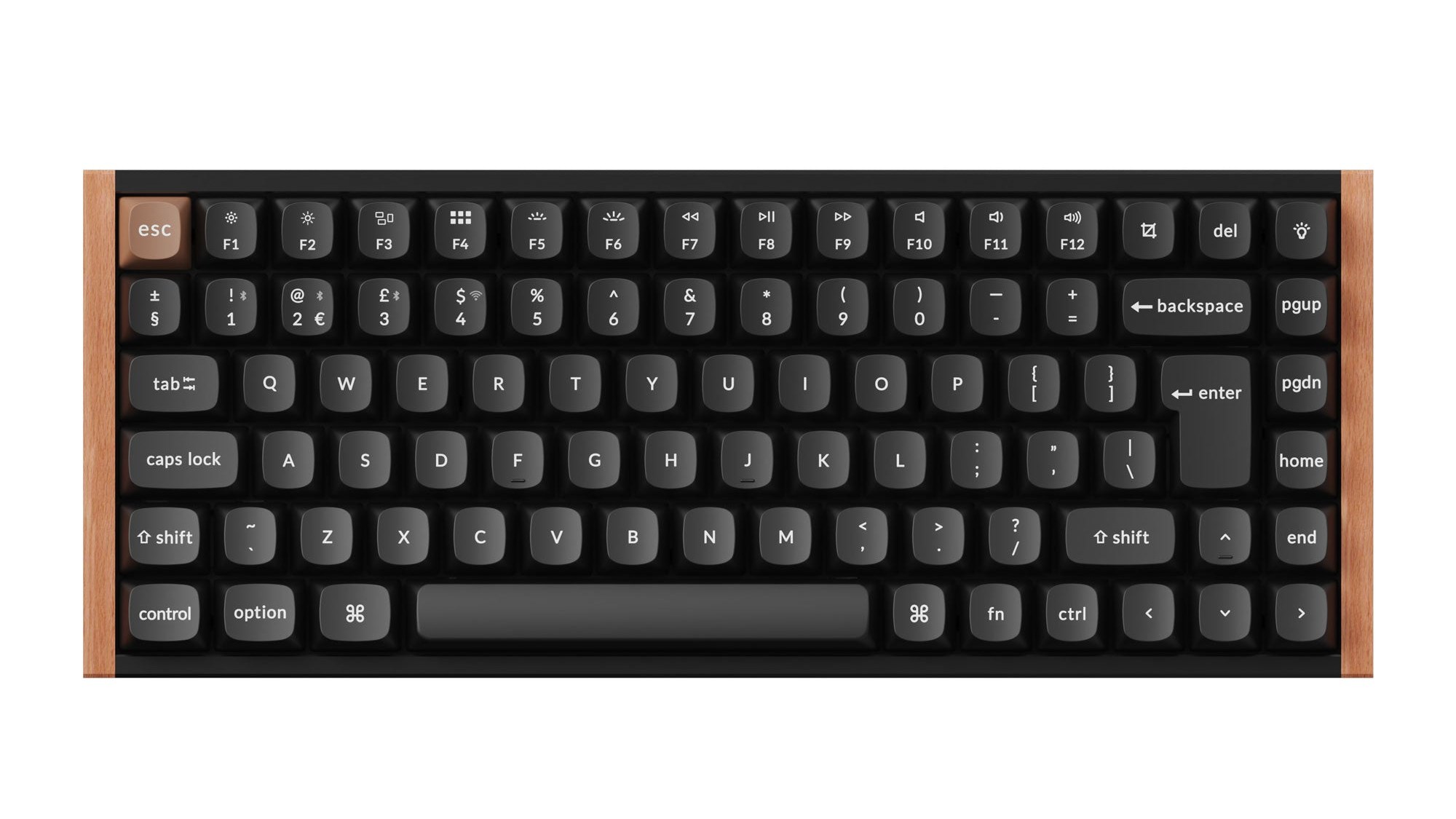
The Special Edition adds solid wood sides and rounded OSA keycaps. The Standard Version has an aluminium frame and shine-through keycaps that show off the RGB lighting. The switches and features are the same.
- Special Edition: light wood on the white model, dark wood on the black. The OSA double-shot PBT keycaps are not shine-through, so the backlight glows around the keys rather than through the letters. Tom’s Hardware and TechWeLike both flagged this for typing in the dark.
- Standard Version: Cherry-profile shine-through keycaps and an aluminium frame, and a little cheaper.
Version 1 or Version 2? Keychron now sells two switch versions. Version 1 has a TMR (tunnelling magnetoresistance) sensor under every key, which Keychron says gives finer accuracy, but it only accepts Gateron double-rail magnetic switches. Version 2 also takes Keychron’s own Lime magnetic switches. The models we sell are Version 1, which you can tell from the part number: Version 2 part numbers end in G, such as K2H-F1G.
Keychron K2 HE UK layout and price
Yes, the K2 HE comes in a proper UK ISO layout, with the tall Enter key, the £ symbol on 3 and the extra key next to left Shift. Keychron’s UK store lists the Special Edition at £139.99 and the Standard Version at £129.99.
Make sure you buy the UK version. Keychron’s main K2 HE models use the US ANSI layout, which has a wide Enter key, no £ key and a different left Shift. The UK part numbers end in -UK: K2H-F1-UK for the black Special Edition and K2H-Q1-UK for the white. Both come with keycaps for Mac and Windows.
On Keychron’s US site the Special Edition is $139.99. The product pages on our site show the current price for the black and white UK models.
Who should not buy the Keychron K2 HE keyboard
Skip the K2 HE if you want tactile or clicky switches, a volume knob, or a number pad. Choose a regular mechanical Keychron instead.
- You want tactile or clicky keys: the K2 HE only takes linear magnetic switches. The Keychron K2 Max and K2 V3 use normal hot-swappable mechanical switches, so you can fit almost any you like.
- You want a knob: Tom’s Hardware missed one at this price, and you will need a key combination or remapped keys for volume.
- You need a number pad: 75% boards have none. TechWeLike missed it for work.
- You only type: the magnetic features are mostly for gaming, so a cheaper mechanical board will type just as well.
Browse all our mechanical keyboards.
Quick answers
Yes, if you want one keyboard for typing and gaming. Tom’s Hardware gave it an Editor’s Choice award, and its magnetic switches add adjustable actuation and rapid trigger.
Yes. Rapid trigger, actuation from 0.2mm and Last Keystroke Prioritisation all help in shooters. Its polling rate is 1,000Hz, which suits all but the most competitive players.
Only for other magnetic switches. Version 1 takes Gateron double-rail magnetic switches only; Version 2 also takes Keychron Lime switches. Normal mechanical switches do not work.
Keychron quotes up to 110 hours from 4,000mAh. Tom’s Hardware went nearly two weeks without charging with the backlight on about 20% of the time.
Yes. It has a Mac and Windows switch on the side and comes with keycaps for both.
No download. You customise it in the Keychron Launcher web app in Chrome, Edge or Opera, with the keyboard connected by cable.
Yes. The UK ISO versions are K2H-F1-UK (black Special Edition) and K2H-Q1-UK (white Special Edition), with the tall Enter key and the £ symbol.
The Special Edition has wood sides and OSA keycaps that are not shine-through. The Standard Version has an aluminium frame and shine-through keycaps. Performance is the same.
How we know
We are a UK technology retailer and we sell the Keychron K2 HE Special Edition in the UK layout. We did not lab-test it. Typing, gaming and battery findings come from the reviews by Tom’s Hardware, APH Networks and TechWeLike, which each used the Special Edition for weeks. Specifications, switch versions and prices come from Keychron’s global and UK stores, read on 8 October 2026, and we matched the models we sell to Keychron’s part numbers.
Sources
- Tom’s Hardware, Keychron K2 HE Special Edition review.
- APH Networks, Keychron K2 HE review.
- TechWeLike, Keychron K2 HE wireless keyboard review, December 2025.
- Keychron, K2 HE product page and specifications.
- Keychron UK, K2 HE ISO layout collection.
Images: Keychron product images, cropped to 16:9 by us.
About Hardvance Team
The Hardvance Team is the editorial team at Hardvance, a UK computer and electronics retailer based in Mildenhall, Suffolk. We build and upgrade PCs and sell laptops, phones, networking gear, monitors and printers, and our guides cover the same ground. Every guide names its sources and explains how we checked the figures, and we say plainly when something is our opinion rather than a tested result.
View all posts by Hardvance Team